Lesson 09 · 90 minutes · 12 parts
Streaming
From bedroom to studio: the gear, platforms, formats and show flow of live broadcasting. How to build a stream people watch to the end, and what most often goes wrong on air.
This lesson has no English narration yet. The Czech version is narrated.
What you will take away
- -Explain why a live broadcast works differently from a recording, and decide when (not) to use it.
- -Design a stream at three price levels and know what each level can handle.
- -Understand the signal path: camera, audio, light, network, encoder, platform, viewer.
- -Choose software and a destination to fit the goal (YouTube, LinkedIn, Teams, Twitch) and set the bitrate and latency.
- -Write a run sheet and plan the show flow so viewers stay to the end.
- -Read retention numbers and know what to do with the content after the broadcast.
Lesson plan
- 5 minIntro and a question for the class · The “Why go live” section. Who has watched something live today? Guess how many hours of live content the world watches in a year.
- 5 minStudent presentation · Find a live stream of a smaller sport or event and describe what you could see: how many cameras, graphics, commentary, how many viewers.
- 6 minHistory of live video · Justin.tv, Twitch, the phone in your pocket, the 2020 pandemic, Netflix and 65 million streams.
- 14 minStudio and gear: levels, video, audio · Three studio levels and what they cost (7 min); cables, capture cards, NDI (6 min); microphones, faders, lighting (6 min).
- 16 minSoftware, destinations, signal out · OBS, StreamYard, vMix; YouTube, LinkedIn, Teams, Twitch; bitrate, latency, backup (6 + 5 + 5 min).
- 13 minFormats and show flow · Webinar, company town hall, video podcast, sports (5 min); run sheet, roles, viewer questions (8 min).
- 11 minRetention and case study: Studio HOPI Connect · Who watches to the end and why (5 min); the studio’s signal path and its rules (6 min).
- 15 minPair exercise · Design a stream for your club: goal, audience, studio level, destination and five lines of a run sheet. Two pairs present their design.
- 5 minSummary and quiz · Five questions, three options; briefly explain why each correct answer is right.
Contents
- 1Why go live
- 2History: from Justin.tv to the pandemic
- 3Three studio levels and what they cost
- 4Video: camera, cable, capture, NDI
- 5Audio and lighting
- 6Software: switching on your computer or in the cloud
- 7Destinations: where to send the signal
- 8Signal out: bitrate, latency, internet, backup
- 9Formats: from webinars to video podcasts
- 10Show flow: script, running order, host
- 11Retention: who watches to the end, and what to do about it
- 12Case study: Studio HOPI Connect
1Why go live
Live is an event, a recording is convenience
- ·Live = now or never: the viewer is a participant, not a consumer
- ·36.4 billion hours of live viewing in 2025 (Stream Hatchet)
- ·People watch people: 22% of Twitch viewing is no longer games
- ·A stream is the cheapest TV station you can build yourself
Live streaming means broadcasting video and audio over the internet in real time. It differs from a recording in three ways: it happens now, viewers can step into the action (chat, questions, polls), and you can’t fast-forward it. A recording is convenient; a live broadcast is an event. People set aside time for it, talk to you and to each other, and leave feeling that they were there. That’s why it only makes sense to go live with things that gain something from being live: results, an interview with questions, a training session with discussion, a match. A lecture without interaction is better off as a recording.
The scale is huge. According to Stream Hatchet, people watched 36.4 billion hours of live streams in 2025, only 2% less than at the pandemic peak in 2021 (37.1 billion). For scale: 36.4 billion hours is roughly 4.2 million years of viewing in a single year, and that’s only platforms like Twitch, YouTube Gaming and Kick, not counting Teams, Zoom or TV websites. Twitch holds more than half but is losing ground: in 2025 it lost 8.3 percentage points of share (from about 61% to 52.8%) after a crackdown on fake viewers, known as viewbotting, and because of Kick, which grew 131%.
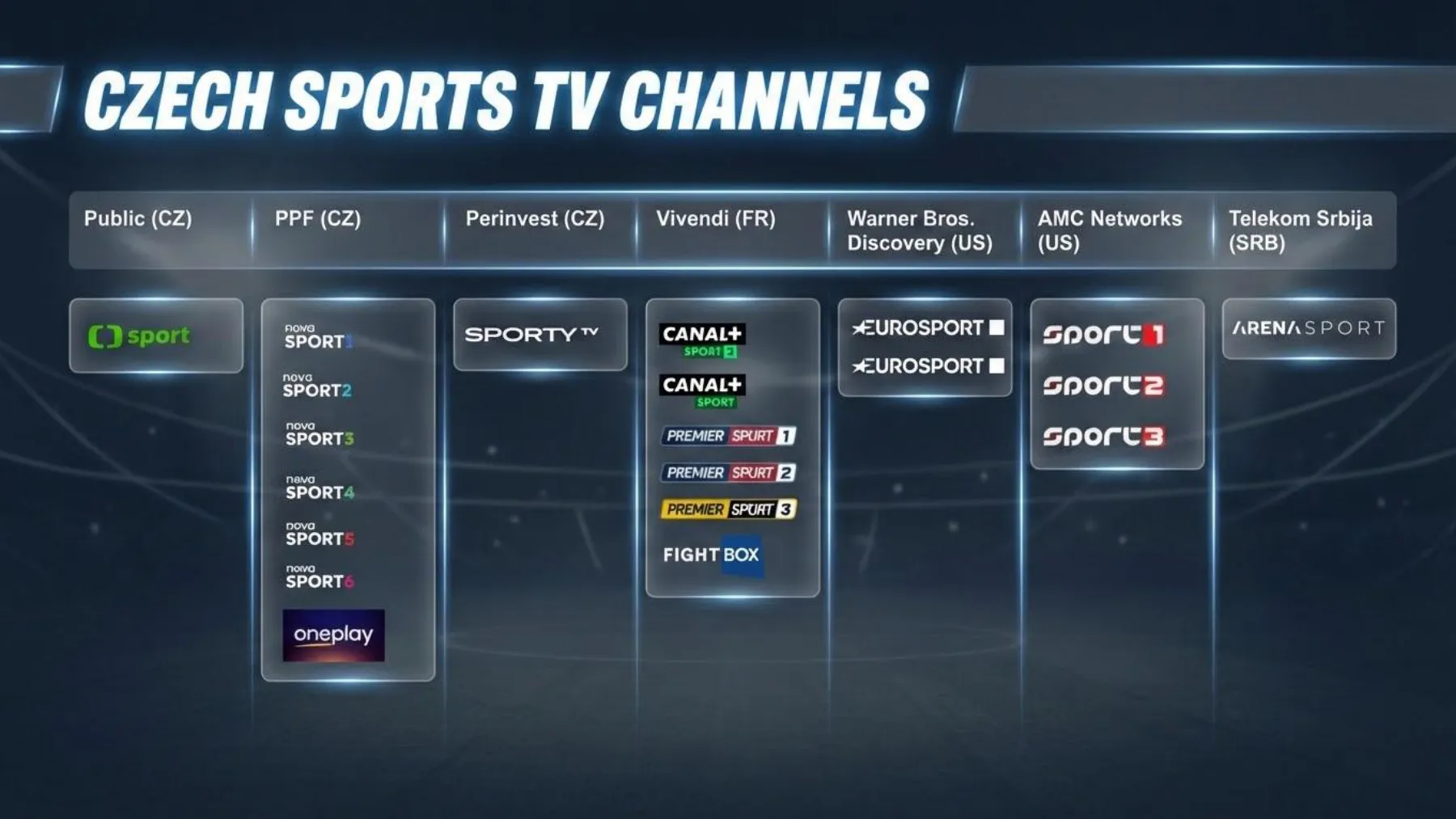
The most interesting shift is in content: people watch people. On Twitch, the Just Chatting category (a talking head with no game) grew 25% in 2025 and IRL streams (in real life: the camera outdoors or in everyday life) grew 19%; non-gaming content now makes up 22% of Twitch viewing. And in the Czech context: during the Paris 2024 Olympics, Czech Television, the public broadcaster, recorded 10.2 million online stream starts alongside 4.6 million TV viewers. Live sports can no longer do without streaming; more on that in the Media and Sports chapters.
- 36.4 bn h
- watched live worldwide in 2025
- 22%
- of Twitch viewing is non-gaming content (2025)
- 10.2 million
- ČT online stream starts during the Paris 2024 Olympics
Stream Hatchet
Stream Hatchet
Czech Television / Lupa.cz
Who holds live viewing in 2025
unit: %
- Twitch52.8%
- YouTube Gaming24.3%
- Kick12.4%
- Other10.5%
Of the 36.4 billion hours in total, Twitch holds half, but YouTube Gaming and Kick are growing; shares from the full report.
data table
| Twitch | 52.8% | 19.2 bn h, −8.3 pp |
|---|---|---|
| YouTube Gaming | 24.3% | 8.8 bn h, record year |
| Kick | 12.4% | 4.5 bn h, +131% |
| Other | 10.5% |
For discussion
When did you last watch something live, and why didn’t you wait for the recording? What would have to happen for you to wait?
Rabbit holes
- GameSquare: press release on the 2025 report ↗ · The key numbers on one page: 36.4 billion h, the 2021 peak of 37.1 billion h, the growth of Just Chatting.
- Stream Hatchet: 2025 Yearly Report ↗ · A summary of the report, plus the full version to download, with platform shares.
2History: from Justin.tv to the pandemic
Platforms come and go, the audience stays
- ·Gamers: Justin.tv 2007 → Twitch 2011, Amazon pays $970 million
- ·Phones: Periscope 2015, Facebook Live 2016, LinkedIn Live 2019
- ·Pandemic 2020: Zoom goes from 10 to 300 million daily participants
- ·Netflix 2024: 65 million concurrent streams, buffering couldn’t keep up
Live video on the internet is older than YouTube, but it went mainstream in 2007, when Justin Kan launched Justin.tv and broadcast his own life 24 hours a day with a camera on his cap. The gamers who streamed games there soon outgrew the founders, and so on June 6, 2011, the spin-off Twitch was born. That same year, on April 8, 2011, YouTube announced live streaming for its partners, YouTube Live. In 2012, Hugh Bailey released the first version of OBS (Open Broadcaster Software), a free, open-source tool that is still the default choice for streamers around the world. And on August 25, 2014, Amazon bought Twitch for $970 million in cash.
The second wave came with the phone in your pocket. Meerkat came out at the end of February 2015 and became the hit of the SXSW conference in March; on March 26 it was steamrolled by Periscope, which Twitter had bought even before its launch. Facebook opened live video first to celebrities (August 2015) and to everyone in January 2016; Meerkat was gone within a year. LinkedIn Live arrived on February 11, 2019, as an invitation-only beta, and from the start only through partner tools. Periscope disappeared from the app stores on March 31, 2021. The lesson: platforms come and go; your gear, your script and your audience stay.
The 2020 pandemic turned a niche skill into a necessity. Zoom went from 10 million daily meeting participants in December 2019 to more than 300 million in April 2020. Twitch grew from 11 billion hours watched (2019) to roughly 18.6 billion (2020), an increase of about 70%, and peaked in 2021 at 24.3 billion hours.
On November 15, 2024, Netflix streamed the Jake Paul vs. Mike Tyson fight: 60 million households, a peak of 65 million concurrent streams, and, in Netflix’s own words, it “had our buffering systems on the ropes.” Even the world’s biggest streaming company found out that live broadcasting is a different discipline from video on demand: you can’t pre-encode it, cache it or replay it. Remember that the next time you promise your boss a stream for 10,000 people.
- $970 million
- paid by Amazon for Twitch in August 2014
- 300 million
- daily Zoom meeting participants in April 2020 (10 million in December 2019)
- 65 million
- concurrent streams of the Paul vs. Tyson fight on Netflix
Wikipedia / Amazon
Zoom / Engadget
Netflix / NBC News
Hours watched on Twitch per year
unit: bn h
The pandemic doubled viewing within two years; since the 2021 peak, Twitch has lost a little every year. TwitchTracker data, 2020 estimated from the monthly average, 2025 from Stream Hatchet.
data table
| 2016 | 4.9 bn h | |
|---|---|---|
| 2017 | 5.9 bn h | |
| 2018 | 9.3 bn h | |
| 2019 | 11 bn h | |
| 2020 | 18.6 bn h | estimate: 1.55 bn h per month × 12 |
| 2021 | 24.3 bn h | |
| 2022 | 22.4 bn h | |
| 2023 | 21.4 bn h | |
| 2024 | 20.9 bn h | |
| 2025 | 19.2 bn h | Stream Hatchet; TwitchTracker: over 19 bn h |
Rabbit holes
- Twitch (Wikipedia) ↗ · The whole story from Justin.tv to Amazon, with dates and numbers.
- YouTube is going LIVE (2011) ↗ · The original announcement from April 8, 2011: a beta for partners only.
- LinkedIn debuts LinkedIn Live (TechCrunch, 2019) ↗ · Why LinkedIn bet on partner tools from the start.
- 60 million households watched Tyson-Paul (NBC News) ↗ · The numbers, plus Netflix admitting that buffering couldn’t keep up.
3Three studio levels and what they cost
Don’t buy level three for a level-one job
- ·1 Bedroom: phone or webcam, USB mic, window; under CZK 10,000
- ·2 Semi-pro: mirrorless camera, lav mic, 2 lights; CZK 60,000–150,000
- ·3 Studio: 3 networked cameras, mixing console, control room; CZK 300,000–700,000
- ·Each level has a different job: a call, an interview, a panel with an audience
A studio isn’t a room; it’s a decision about what the viewer should see and hear. We’ll distinguish three levels, and each has a different purpose. The most common mistake is buying level-three gear and using it for level-one jobs: a panel with an audience needs three cameras, a two-person interview one to three, and a call with a client none at all; a webcam and a good microphone are enough. The level prices are estimates in Czech crowns, excluding the space, furniture and people; the prices of individual items in dollars and euros are manufacturers’ indicative prices as of October 2026.
Notice what changes most between the levels: not the resolution, but the number of people you look after and the number of things that can go wrong. At level one, one thing can go wrong (the internet). At level three there are twenty: the battery in a mic, the NDI license, an overheated camera, the HDMI cable to the TV, a guest who talks away from the mic. That’s why level three needs a person who does nothing during the broadcast except keep watch.
- -Level 1, bedroom (under CZK 10,000, estimate): a phone on a tripod or a webcam, a USB microphone or a headset, a window to the side as the main light, OBS or simply StreamYard in the browser. Enough for a call, a training session for 20 people, a regular podcast with screen sharing.
- -Level 2, semi-pro (CZK 60,000–150,000, estimate): a mirrorless camera with clean HDMI output through a capture card, an HDMI-to-USB converter (Elgato Cam Link 4K, $99.99), a wireless lavalier mic (third-generation RØDE Wireless GO: range up to 260 m, 7 h of battery, $199), two LED panels with softboxes, a Stream Deck for switching scenes ($149.99), a cable to the router. Enough for a two-person interview, a webinar with a guest, a video podcast.
- -Level 3, studio (CZK 300,000–700,000, estimate): three networked PTZ cameras (remote-controlled cameras that pan, tilt and zoom), for example the Obsbot Tail Air at about €690 each including the NDI license, which is an add-on to the base version for €109; a mixing console with physical faders (RØDECaster Pro II: 4 inputs, 6 faders), a hardware switcher (ATEM Mini Pro, $349) or OBS with a Stream Deck, lights on a truss (an aluminum frame under the ceiling), a PoE switch, a TV for guests, a person in the control room. Enough for a panel, a company town hall (an all-hands meeting with leadership) with a live audience in the room, a hybrid conference.
- $99.99
- Elgato Cam Link 4K: turns a camera into a webcam
- $149.99
- Stream Deck, 15 buttons for scenes and cameras
- $349
- ATEM Mini Pro: switches 4 HDMI inputs without a computer
- ~€690
- Obsbot Tail Air with NDI activated, per unit (indicative, October 2026)
Elgato
Elgato
Blackmagic Design
OBSBOT store
For discussion
Pick your club, school or company: which level do you really need, and which would you want just because it looks professional?
4Video: camera, cable, capture, NDI
It’s the lens, light and cable, not the camera
- ·The camera matters less than the lens, the light and a clean HDMI output
- ·HDMI about 15 m, SDI 100 m with a lock, NDI over a regular network with PoE power
- ·A capture card turns a camera into a webcam (Cam Link 4K, $99.99)
- ·NDI High Bandwidth ~130 Mbps, NDI HX3 ~50–62 Mbps at 1080p60
The video signal path always has the same links: the source (camera, phone, screen), transport (cable or network), capture (a capture card or network input on the computer), switching (OBS, vMix, ATEM), the encoder (which packs the picture into H.264, HEVC or AV1) and the platform. Every link can fail, and every link adds delay. The camera itself matters less than people think; what matters is the lens, the light, and whether the camera has a clean HDMI output without icons and menus and doesn’t switch itself off after half an hour.
Cables have physical limits. HDMI reliably handles about 15 m at 1080p and less at 4K, has no lock, and drops out when someone bumps into it. SDI (coaxial cable with a BNC connector) goes 100 m over a single cable, locks in place, and is used by every outside broadcast truck: 3G-SDI is enough for 1080p60, 12G-SDI for 4K60. NDI (Network Device Interface) sends video over a regular Ethernet network: the camera sits on the network like a printer, OBS sees it as a source, and a single cable powers it at the same time (PoE). The variants: NDI High Bandwidth takes about 130 Mbps at 1080p60 and 250 Mbps at 4K60, NDI HX3 50–62 Mbps with latency under 100 ms. So a gigabit network can carry a few full streams or around ten HX3 streams, but definitely not over office Wi‑Fi.
A capture card turns an HDMI output into a USB webcam that Zoom, Teams and OBS all recognize. The Elgato Cam Link 4K, at $99.99, handles 1080p60 and 4K30 and is the cheapest step from a webcam to real video. A hardware switcher such as the ATEM Mini Pro ($349, 4× HDMI) replaces the computer: buttons switch the cameras, it has its own encoder and it can start the stream by itself. It’s useful where there’s nobody around who understands OBS. A PTZ camera (pan, tilt, zoom) replaces a camera operator: you save positions as presets and switch between them from the Stream Deck.
- -A camera with clean HDMI (no icons) and mains power, not battery power.
- -A lens of around 24–35 mm (equivalent) for a talking head; wider distorts, longer needs space.
- -One format across the whole chain: 1080p25 or 1080p30 everywhere, otherwise the switcher converts and the picture stutters.
- -Tape cables down on the floor, never run HDMI through a doorway, use SDI or NDI for distances over 10 m.
- -PoE power: one cable = video, control and power; the switch needs a power budget for all the cameras.
Rabbit holes
- NDI HX3 (NDI documentation) ↗ · The official numbers: 50–62 Mbps at 1080p60, latency under 100 ms.
- NDI High Bandwidth (NDI documentation) ↗ · Full quality over the network: about 130 Mbps at 1080p60 and 250 Mbps at 4K60.
- SDI vs. HDMI (Castr) ↗ · When HDMI is enough and when you need a locking coaxial cable.
- ATEM Mini (Blackmagic Design) ↗ · Switcher and encoder in one box; prices and models.
5Audio and lighting
Audio first, light second, camera third
- ·Viewers forgive bad video, not bad audio: they leave within a minute
- ·Mic as close to the mouth as possible: a lav mic 15 cm from the mouth
- ·A console with physical faders: your hand on the fader, not on the mouse
- ·Three-point lighting: key, fill, back; one color temperature
Viewers will forgive a soft picture, background noise or a darker shot. They won’t forgive audio they can’t understand, and they’ll leave within a minute. That’s why audio comes first in both the budget and the checklist. The basic rule: the mic as close to the mouth as possible. A lavalier mic 15 cm from the mouth sounds better than a CZK 20,000 microphone on a table a meter away. Wireless kits (the current third-generation RØDE Wireless GO: range up to 260 m, 7 hours of battery) give guests freedom and give you the job of keeping them charged.
More mics means mixing. Software can do it, but in a live broadcast you want a physical controller: a mixing console like the RØDECaster Pro II has 4 combo inputs, 6 faders, two USB-C outputs to two computers, and programmable buttons for jingles. When a guest starts whispering, you reach for the fader and that’s it. In software, you’re hunting for the right window, and meanwhile ten seconds of silence have gone by. Headphones on the operator’s ears are a must: what you hear from the speakers in the room isn’t what the viewer hears.
Light is the cheapest way to improve the picture. The classic is three-point lighting: the key light from the side at an angle of about 45°, a weaker fill light from the other side, and a back light that separates the person from the background. In practice, two LED panels with softboxes are enough, plus switching off the overhead fluorescent light, which creates shadows under the eyes. Keep one color temperature across the whole room: 3,200 K (tungsten) or 5,600 K (daylight), not a mix, or one face will be orange and the other blue. A window is a great key light in the morning and an enemy in the afternoon; the curtain is part of the gear.
- -A sound check before every broadcast: record 30 s and play it back on headphones.
- -Batteries: charge the mics after every use, keep a spare transmitter in your pocket.
- -A mic for everyone who speaks; the audience in the room gets one handheld mic, carried around by the organizer.
- -Music only with a license; platforms detect it and mute or delete the stream.
- -Turn off notifications, the air conditioning near the mic, and the phone lying on the table (hum).
6Software: switching on your computer or in the cloud
One tool done properly, not five done halfway
- ·OBS Studio: free, open source, scenes and a virtual camera
- ·Cloud: StreamYard (free, Core $44.99/mo), Restream ($19)
- ·Desktop: vMix ($60–$1,200 one-time), Ecamm Live (Mac, from $16)
- ·Hardware: ATEM Mini Pro for $349, switching without a computer
Production software combines sources (cameras, screen, graphics, guests) into scenes and sends the result to the encoder. There are three families: desktop (OBS, vMix, Ecamm Live) runs on your computer and needs processing power, cloud (StreamYard, Restream Studio) runs in the browser and invites guests via a link, and hardware (ATEM) runs in a box without a computer. The choice depends on who operates the stream and where the guests are.
OBS Studio is free, open source, around since 2012, and runs on Windows, Mac and Linux. It handles scenes, transitions, NDI via a plugin, a virtual camera (OBS shows up as a webcam in Teams or StreamYard) and full-quality recording alongside the stream. The downside: you have to bring in remote guests some other way (Zoom, vdo.ninja), and the settings have a hundred options. vMix (Windows only) is a one-time purchase: Basic HD for $60, HD for $350, 4K for $700, Pro for $1,200; it has its own video calls (vMix Call), titles and instant replay for sports. Ecamm Live (Mac only) costs $16 a month (Standard) or $32 (Pro) billed annually and is the fastest route to a good-looking result for one person.
StreamYard lives in the browser: a guest gets a link, clicks it and is in the studio, while you switch layouts and put chat comments on screen. It’s free for up to 6 people on screen including you, with the StreamYard logo; Core costs $44.99 a month ($35.99 billed annually), with no logo, 10 people on screen and 3 destinations; Advanced costs $88.99, with 8 destinations. Restream is primarily a multistreaming tool: it sends one stream to several platforms at once (free for 2 channels, Standard at $19 a month for 3, Professional at $49 for 5), and it has its own studio too. The combination in Studio HOPI Connect: OBS collects the cameras over NDI, a Stream Deck switches between them, and the virtual camera goes into StreamYard, which sends the stream to YouTube, LinkedIn or Teams.
- -A 1:1 call or training from slides: Teams or Zoom, nothing else.
- -A regular show with remote guests: StreamYard or Restream Studio.
- -Several cameras in one room, graphics, NDI: OBS; Ecamm on a Mac, vMix on Windows.
- -No computer and no technician: ATEM Mini Pro, a cable to the router, the On Air button.
- -Always record locally in full quality: the stream is just a lossy copy.
Rabbit holes
- OBS Studio ↗ · Download, documentation, plugins (NDI, transitions, captions).
- StreamYard: pricing ↗ · What’s free and when you start paying; limits on guests and destinations.
- vMix: edition pricing ↗ · A one-time license from $60 to $1,200, with a 60-day trial.
- Restream: pricing ↗ · A multistreaming tool; how many channels at once.
7Destinations: where to send the signal
Stream where your audience already is
- ·YouTube: public, no viewer limit, the recording stays
- ·LinkedIn Live: B2B, 150+ followers, scheduled events only
- ·Teams: internal; meetings 1,000 active, events up to 100,000
- ·Twitch and Kick: community and chat; games, Just Chatting, IRL
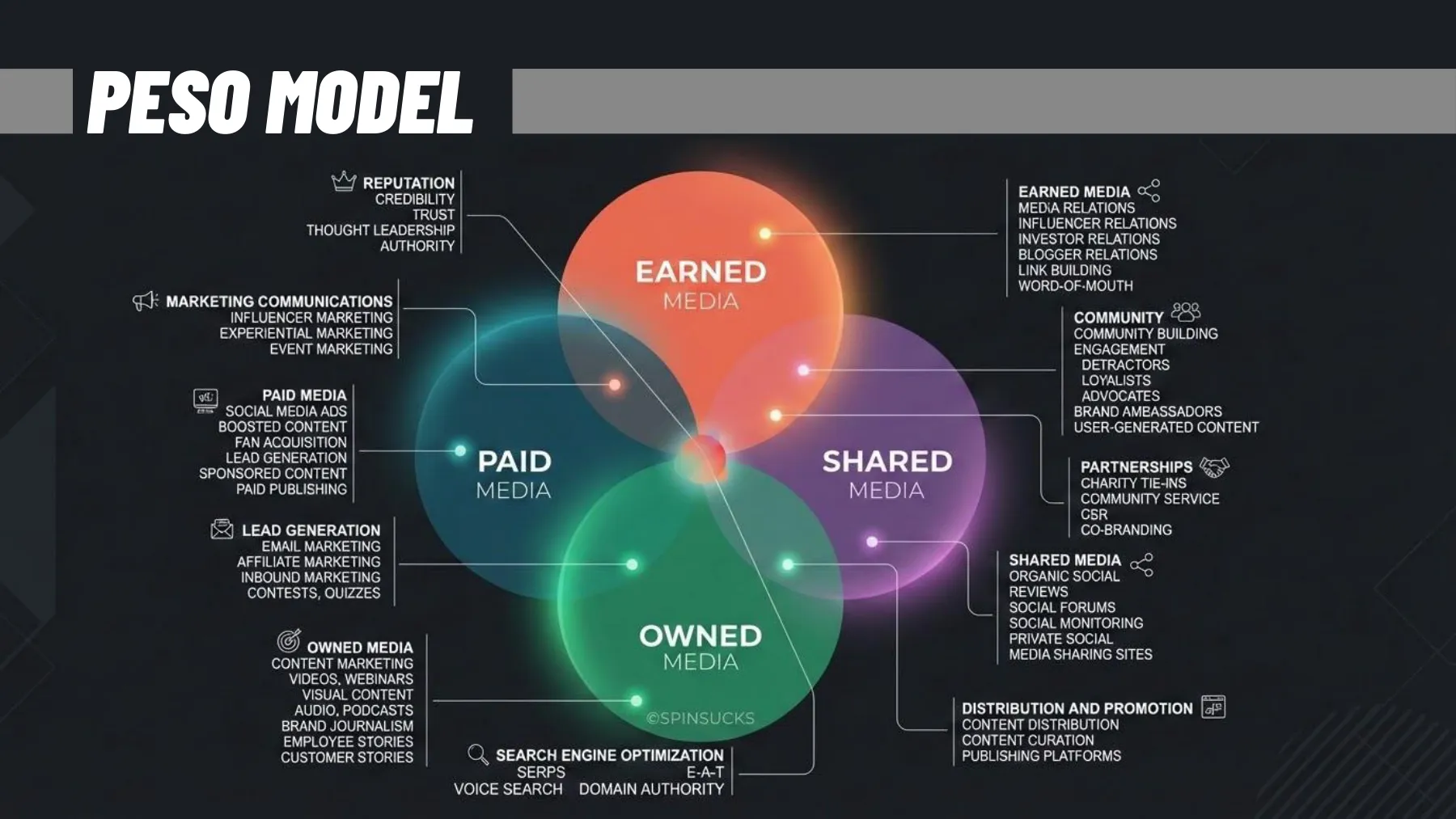
The destination is where the viewer watches the stream, and it’s the audience that decides it, not the technology. The same logic applies as with the PESO model in the Media chapter: YouTube, LinkedIn and Twitch are shared platforms with someone else’s rules and algorithm; a player embedded on your own website is an owned channel. In practice, you combine the two: the stream runs on YouTube and is embedded on the club’s website, where the program, the partners and the registration are.
YouTube is the default choice for the general public: no viewer limit, the recording stays on the channel, and you can stream as unlisted for internal purposes. LinkedIn Live is for B2B. Access goes to a profile or page with more than 150 followers or connections, an account older than 30 days, and no violations of the community policies. You broadcast through a partner tool (Restream, Socialive, StreamYard, Switcher Studio) or from your own encoder such as OBS via RTMP (Real-Time Messaging Protocol, the standard protocol for sending a stream to a platform). On top of that, since June 22, 2026, LinkedIn has scrapped spontaneous broadcasting: every live must be set up in advance as an Event, even if only a few minutes before it starts. Twitch and Kick are about community and chat: games, Just Chatting, IRL; for a company, they’re only worth it where there really is someone to chat.
Microsoft Teams is for the internal world. A regular meeting holds 1,000 active participants and up to 10,000 more as view-only attendees; events range from interactive ones for up to 1,000 people to broadcasts for 100,000 attendees with registration, moderated Q&A and organizer roles. Microsoft is retiring the old Teams Live Events: after June 30, 2026, they can no longer be scheduled, and they have been replaced by the unified Events app, where town hall and webinar are just settings. For external guests without an account, though, Teams is unfriendly: it shows them sign-in windows, and some guests give up.
The destination also decides who makes money from the stream and how much the platform keeps. On Twitch, viewers pay for channel subscriptions in three tiers and send Bits, a virtual currency they use to cheer in the chat; on top of that, the streamer gets a share of ad revenue. From subscriptions, a streamer gets half of the net revenue by default. Since May 2024, the Plus Program raises the share to 60% when a channel holds at least 100 points for three months in a row, and to 70% from 300 points; one Tier 1 subscription is one point. Since May 2026, even streamers who aren’t Affiliates or Partners yet can turn on subscriptions and Bits, but Twitch only pays them out once they reach Affiliate status, which since June takes 25 followers instead of 50. YouTube leaves the creator 70% of Super Chat and Super Stickers, paid messages and stickers in the chat, and of channel memberships, plus 55% of ad revenue, live streams included. But it only unlocks viewer payments for a channel with at least 500 subscribers and enough watch time, for example 3,000 hours over the past year. Kick lures creators with 95% of subscription revenue and also pays partners in its program for the streams they broadcast. In September 2026, it changed how those rates are calculated so that payouts fluctuate less; the subscription split stayed the same.
The second big source is money from brands. A sponsored stream takes several forms: graphics over the picture with the partner’s logo, a segment in which the creator presents a product or plays a sponsored game, and a link with a discount code in the chat. YouTube wants creators to mark such content as paid promotion, and it then shows viewers a label. In August 2026, Twitch opened brand campaigns to smaller streamers with Affiliate status, too. What this looks like in the Czech Republic is shown by Agraelus, still the biggest Czech streamer according to Forbes. Forbes estimates his earnings at CZK 25 million before tax for the year to June 2026. Most of it comes from subscriptions and fan donations during live streams, but more and more from long-term partnerships with domestic brands, such as Komerční banka or the football club Slovan Liberec, and from merchandise sales.
For a club, a federation or a company, the math works out differently. The average Twitch channel has around 25 viewers, as the Retention section will show, so viewer payments won’t pay for the stream, and its value is mostly indirect: the partner in the picture, reach, and a recording that keeps working after the broadcast. Direct money goes to those with a strong brand and the rights in their own hands. According to Forbes, tickets and paid broadcasts, so-called pay-per-view, made up roughly two-thirds of Oktagon MMA’s revenue, which topped CZK 250 million in 2022; TV rights and sponsors carry the rest. Since June 2026, when qualification for the Olympic Games in Los Angeles began, the International Judo Federation has been streaming every World Judo Tour event live only to JudoTV subscribers, and it wants their money to pay for better production. Platforms guard rights, too. YouTube scans every live stream, and when it finds third-party content, such as music or someone else’s live broadcast, it can replace the stream with a placeholder image or interrupt it. That can happen even with a license if the rights holder doesn’t add your channel to their allowlist. In a professional competition, the league sells the rights, not the club: since the 2024/25 season, the Czech football league has been broadcast by O2 TV, now Oneplay, its broadcast contracts bring the league more than CZK 430 million a year, and clubs can now share match footage on their websites and social media.
- -The general public, a long-lived recording, searchability: YouTube.
- -B2B, personal brand, an expert panel: LinkedIn Live via StreamYard or Restream.
- -Employees, sensitive information, attendance: Teams.
- -A young audience, chat as content, a regular creator: Twitch, Kick, TikTok Live.
- -Several places at once: Restream or StreamYard, but you have to watch the chat on each one separately.
- 100,000
- attendees of a Teams event optimized for large audiences
- 150+
- followers or connections, required for LinkedIn Live
- 70%
- of Super Chat and channel memberships goes to the creator on YouTube
- CZK 25 m
- streamer Agraelus’s earnings for the year to June 2026 (estimate)
Microsoft Learn
LinkedIn Help
YouTube Help
Forbes
Rabbit holes
- Overview of meetings and events in Teams (Microsoft Learn) ↗ · Current capacities of meetings and events after the retirement of Live Events.
- LinkedIn Live: overview (LinkedIn Help) ↗ · Partner tools, your own RTMP stream, and the change from June 22, 2026: scheduled events only.
- LinkedIn Live: access criteria (LinkedIn Help) ↗ · Who can broadcast: 150+ followers or connections, an account older than 30 days, a clean record.
- Forbes Czech: Best-paid YouTubers and streamers 2026 (in Czech) ↗ · Estimated earnings of Czech creators for the year to June 2026 and what they live on: subscriptions, donations, partners, merchandise.
8Signal out: bitrate, latency, internet, backup
Upload at twice the bitrate, a cable, a backup
- ·YouTube 1080p30: 5–14 Mbps in H.264, 4–10 Mbps in AV1 or HEVC
- ·Upload at least twice the bitrate; measure over a cable, on site, on the day
- ·Latency: normal is tens of seconds, low under 10 s, ultra-low under 5 s
- ·Keyframe 2 s, CBR, backup LTE, local recording from the first second
The encoder takes the finished picture and sound and compresses them into a data stream at a given bitrate, which goes out via RTMP to the platform. A higher bitrate means a better picture and higher demands on the internet connection. YouTube recommends 5–14 Mbps for 1080p30 in H.264, 6–17 Mbps for 1080p60 and 3–8 Mbps for 720p; with the newer AV1 and HEVC codecs, about a third less is enough (1080p30: 4–10 Mbps). Audio at 128 kbps AAC stereo, a keyframe every 2 seconds, constant bitrate (CBR). Twitch is stricter: about 6,000 kbps is the ceiling for non-partners, and above it you have no guarantee of transcoding into lower qualities.
The rule for the internet: upload at least twice the bitrate, because the same line also carries the call with the guest, the chat and your colleagues. For 1080p30 at 6 Mbps, you want a stable 12 Mbps up, not the “up to 100 Mbps” from an ad that’s promising download speed. Measure the upload on site, over a cable, on the day of the broadcast, and let a test stream run for at least 10 minutes: the Wi‑Fi holds up for three minutes, and then someone in the room starts a phone backup.
Latency is the delay between something happening and the viewer seeing it. Normal latency on YouTube means tens of seconds and the least buffering; ultra-low latency under 5 seconds is a must for auctions, quizzes and real-time voting, but it’s more sensitive to dropouts. For a town hall with questions from the chat, low latency (under 10 s for most viewers) is enough: the host reads a question 8 seconds later and nobody notices. What you must never skip: a backup. A second encoder (a phone with LTE and the same stream key), local recording, and a pre-made “technical break” slide that you put up when a guest drops out.
- -Upload measured over a cable, a 10-minute test stream, backup LTE ready.
- -Bitrate from the platform’s table, keyframe 2 s, CBR, the same format across the whole chain.
- -The stream key in a password manager, never on screen or in the chat.
- -“Starting soon” and “technical break” slides ready and tested.
- -Local recording runs from the first second, even before the stream does.
Recommended bitrate for YouTube Live (H.264, upper limit)
unit: Mbps
Every step up in resolution or frame rate makes the internet connection more expensive; 1080p30 is a sensible standard for both interviews and training.
data table
| 720p | 8 Mbps | 3–8 Mbps |
|---|---|---|
| 1080p30 | 14 Mbps | 5–14 Mbps |
| 1080p60 | 17 Mbps | 6–17 Mbps |
| 1440p60 | 34 Mbps | 8–34 Mbps |
| 4K60 | 50 Mbps | 14–50 Mbps |
Rabbit holes
- YouTube: encoder settings, bitrates, resolutions ↗ · The official bitrate table for H.264, HEVC and AV1, from 360p to 4K.
- YouTube: Live stream latency ↗ · What normal, low and ultra-low latency mean and what you pay for them.
- Best bitrate for Twitch (Compresto) ↗ · Why 6,000 kbps is a sensible ceiling and what Enhanced Broadcasting does.
9Formats: from webinars to video podcasts
A format you can manage every week
- ·Webinars and training: a speaker, slides, questions, a recording for later
- ·Town hall: leadership speaks, people ask; Teams or unlisted YouTube
- ·Video podcasts: YouTube has 1 billion monthly podcast viewers
- ·Gaming and IRL on Twitch and Kick; sports from ČT sport to the IJF
A format is a deal with the viewer: what they get, how long it will take and what’s asked of them. Live broadcasting has several established formats, and each has different technology, a different show flow and a different success metric.
For a company or a sports organization, the most valuable format is one you can repeat: the same day, the same length, the same jingle. Regularity builds an audience; a one-off show only gets one-off numbers. In judo, the rhythm is set by the tournament calendar, so the publishing plan comes from the calendar, not the other way around. The same goes for a quarterly company town hall or a club podcast every Monday.
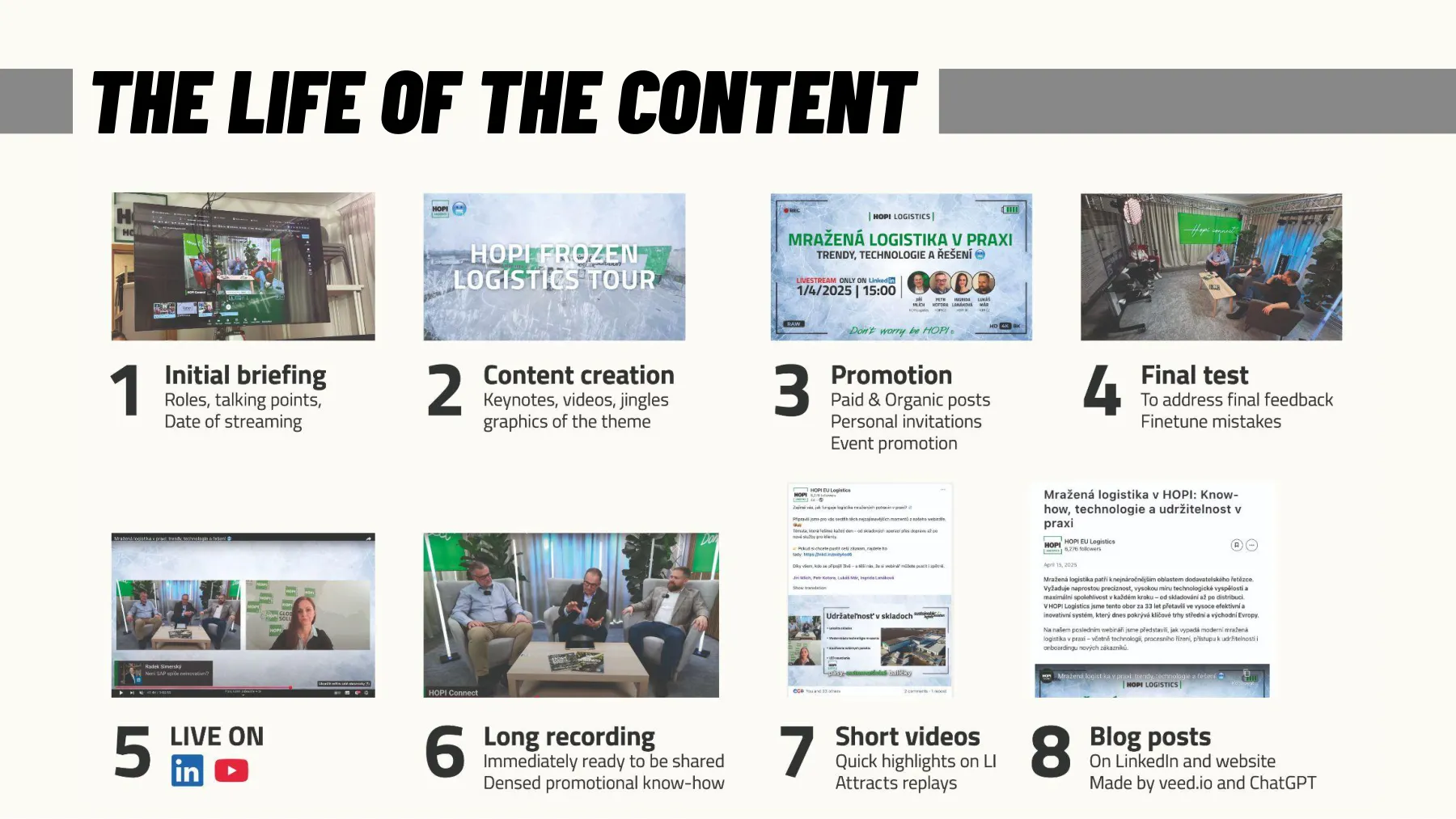
And the live broadcast is only the beginning of the content’s life. An hour-long webinar becomes a recording, a transcript, an article, five clips for social media and a newsletter. If you count a stream’s costs only against the live viewers, you’re counting wrong: according to ON24 benchmarks based on 2024 data, 45% of webinar attendees watched the recording on demand, not the live broadcast. More on repurposing content in the Internet chapter.
- -Webinars and online training: one or two speakers, slides, questions throughout and at the end. 45–60 minutes, registration in advance, the recording as sales content. Metrics: registrations, attendance, questions, material downloads.
- -Town halls and internal streams: leadership speaks to the company, anonymous questions, polls. Teams or unlisted YouTube. Metrics: the share of employees who watched, and the number of questions.
- -Video podcasts: two people at a table, 30–90 minutes, recorded live even without viewers; in February 2025, YouTube announced that (as of January 2025) it had over a billion monthly podcast viewers, and that in 2024 people watched over 400 million hours of podcasts a month on TV screens. Metric: average watch time.
- -News and press conferences: short, precisely timed, with lower thirds and captions; journalists want a clean feed without graphics.
- -Gaming and IRL: hours of streaming, the chat as co-author, regularity over quality. Twitch, Kick, YouTube.
- -Sports: several cameras, replays, results, commentary. From ČT sport to IJF World Tour streams on the federation’s website.
For discussion
Which of these formats could your club or company manage every week for a whole year? That’s the right one.
10Show flow: script, running order, host
Tech gets the stream on air, show flow keeps it watched
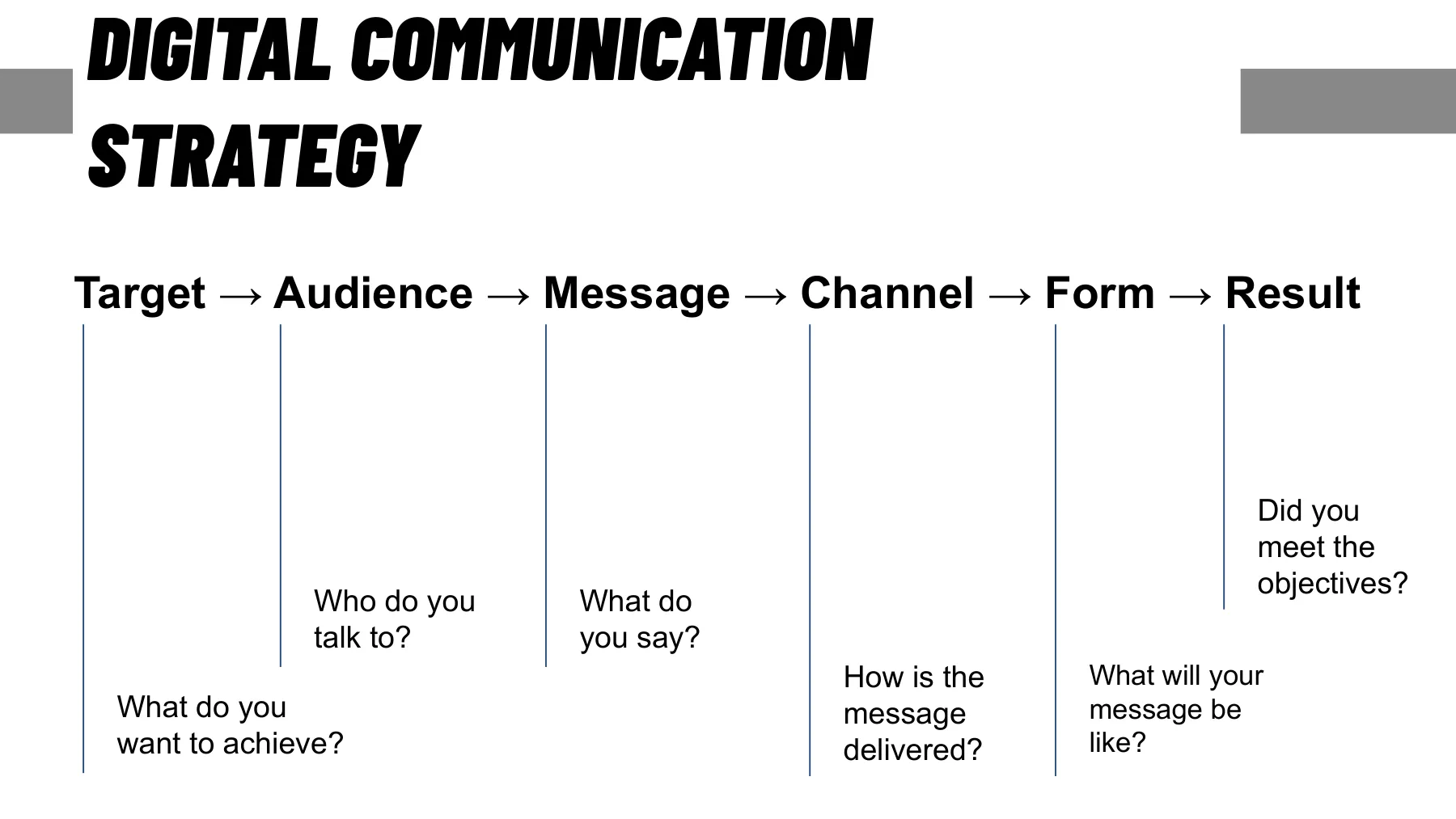
- ·Target → Audience → Message → Channel → Form → Result
- ·Run sheet: Time · Dur · Item · Screen · Audio · Source · Who
- ·The host keeps the pace, the director the picture, the producer the clock
- ·Viewer questions: one tool, a dedicated chat person, backup questions
The tech gets the stream on air; the show flow keeps people watching. Before every broadcast, go through the chain from the Internet chapter: Target → Audience → Message → Channel → Form → Result. What I want (sign-ups for a camp), who I’m talking to (parents of judokas aged 9–15), what I’m saying (dates, price, what the kids will experience), through which channel (YouTube embedded on the website, a link emailed to parents), in what form (30 minutes: a coach, last year’s participant, questions), and how I’ll know the result (sign-ups within a week). Without answers to these six questions, there’s no point in turning on the camera.
Then comes the script, in TV language the rundown or run sheet. It’s a table where every item has a time, a duration, what happens, what’s on screen, what’s in the audio, which device it runs on and who does it: Time · Dur · Item · Screen · Audio · Source · Who. The times are calculated from the durations, so when you move a block, everything shifts automatically.
Roles: the host keeps the pace and talks to the viewers (reads the chat, welcomes, wraps up), the director keeps the picture (cameras, graphics, the remote guest), and the producer keeps time and decides what gets cut when you’re running late. In a small team that’s two people, but never one: whoever is talking can’t be clicking at the same time. Graphics are part of the show flow: lower thirds with name and title (shown for 8 seconds at the guest’s first words), an opening loop with a countdown, a question slide, a break slide, and a closing slide with a call to action and a QR code.
- -Start 10 minutes early with an opening loop: music, countdown, program.
- -A cold open (starting straight with content, no jingle and no welcome) within 30 seconds: why you’re here, what you’ll get, how long it will take.
- -Blocks of 8–12 minutes with a change between them: a guest, a video, a question, a poll.
- -Collect questions with one tool and throughout, not just at the end: Q&A with moderation in Teams, Slido or YouTube chat elsewhere; StreamYard puts a comment on screen.
- -Once the chat moves faster than the host can read, a separate person reads it and sends selected questions to the control room.
- -A question filter: on topic, merge similar ones, one per person; hide spam and insults (YouTube supports a list of blocked words).
- -Three backup questions in case the chat is silent; write down the unanswered questions and answer them after the stream.
- -Close with a call to action: where to click, what happens next, when the recording will be available.
- -A dry run with the guests the day before: 20 minutes saves an hour of panic.
11Retention: who watches to the end, and what to do about it
The first five minutes decide
- ·Webinars: 57% of registrants watch, for 51 minutes on average (ON24, 2024)
- ·Twitch: 2.4 million viewers on 95,700 channels = about 25 per channel
- ·Start with content, not with waiting for latecomers
- ·After the stream: recording, clips, transcript, article; live is just the start
Stream numbers are harsher than TV numbers, because you see every minute when people left. Three metrics are enough: peak concurrent viewers (how many people were there at once), average watch time (how many minutes they lasted) and, for webinars, the registration-to-attendance ratio. In its benchmarks based on 2024 data, ON24 reports that 57% of registrants watch the webinar (live or on demand) and stay for 51 minutes on average; for 2025 data, it reports 60% and 49 minutes. In other words: for a webinar with 200 registrations, expect 110 to 120 people, and they’ll watch an hour of content to the end if it has structure.
On open platforms, reality is more modest. In 2024, Twitch averaged 2.38 million concurrent viewers across 95,700 channels live at the same time, which works out to about 25 viewers per channel (calculated from TwitchTracker). Most streams in the world have fewer viewers than a school class, and that’s fine: 25 of the right people (customers, parents, journalists) are worth more than 2,500 random ones. For a company stream, “what percentage of the target group watched” is a better metric than an absolute number.
The retention curve has almost the same shape everywhere: a steep drop in the first 2–5 minutes (people find out what it is and leave), a plateau in the middle, and a second drop at the first “and finally.” So: start with content, not with waiting for latecomers; put the strongest thing in by minute 10; and announce the end only in the last sentence. After the broadcast, open the retention graph (YouTube Analytics, StreamYard, Teams) and find the minute where the most people left. That’s where the show flow went wrong, not the tech.
- 57%
- of registrants watch the webinar, live or on demand (2024 data)
- 51 min
- average webinar watch time (2024 data)
- ~25
- viewers per Twitch channel on average in 2024 (calculated)
ON24 Webinar Benchmarks
ON24 Webinar Benchmarks
TwitchTracker
For discussion
Think of the last stream you turned off: what minute was it, and what was happening at that moment?
12Case study: Studio HOPI Connect
Three cameras, one person in the control room
- ·Video: 3× Obsbot Tail Air → NDI → OBS on a Mac → StreamYard
- ·Audio: Wireless GO → RØDECaster Pro → USB-C → Mac
- ·A TV behind the main camera: guests look into the lens
- ·Rules: test the audio, use a cable, charge the mics
Studio HOPI Connect was built on the HOPI campus for internal streams, podcasts and video calls, with the goal of handling more than a laptop with a webcam while being run by one person. The full signal path is described at jecminek.co/studio (in Czech); here’s a short version for class.
Video: three Obsbot Tail Air PTZ cameras, powered over Ethernet (PoE) from a switch, send video over the network as NDI to OBS on a Mac; each camera is a separate source. A Stream Deck switches cameras with a single button, with no mouse and no digging through menus. OBS sends the selected shot through the virtual camera to StreamYard, and from there the stream goes to YouTube, LinkedIn or Teams.Tail Air ×3 → PoE switch → NDI → OBS (Mac) → virtual camera → StreamYard → YouTube / LinkedIn / Teams
Audio: wireless RØDE Wireless GO mics on the guests pair with the RØDECaster Pro console, the mix happens on physical faders, USB-C goes to the Mac, and StreamYard picks the console as its microphone.Wireless GO → RØDECaster Pro → USB-C → Mac → StreamYard
From the Mac, a mirrored picture goes over HDMI to a TV behind the main camera: the guests see themselves, the presentation and the stream layout, and because the TV sits behind the lens, they look into the camera.
- -Always test the audio before you go live.
- -Internet by cable to the Mac, not over Wi‑Fi.
- -Charge the mics right after every use.
- -One camera for a call (the middle one), three only for an interview or a panel.
- -On the TV behind the camera, only what the guests should see.
- ~190 Mbps
- three cameras in NDI HX3 at 1080p60 (3× ~62 Mbps): a gigabit network has headroom
- 100
- guests on site fit in Studio HOPI Reloaded, available for rent
NDI docs, calculated
hopiholding.eu
Rabbit holes
- Setup studia HOPI Connect (jecminek.co) ↗ · The full signal path, with the equipment and practical tips (in Czech).
- Studio HOPI Reloaded for rent ↗ · What a professional studio offers: capacity for 100 guests, interpreting, production (in Czech).
For the exam
Terms
- -Live broadcast: it happens now, viewers can step in, and you can’t fast-forward it, so you only go live with things that gain something from being live.
- -Signal path: source, transport, capture, switching, encoder, and platform; every link can fail, and every link adds delay.
- -Revenue share: how much of the viewers’ money the platform leaves the creator; on YouTube 70% of Super Chat and memberships, on Twitch 50 to 70% of subscriptions, on Kick 95%. A club or a company makes money from a stream mostly indirectly, through partners and reach.
- -Bitrate: the data stream the encoder compresses picture and sound into, and your upload should be at least twice that.
- -Run sheet: a table with the columns Time · Dur · Item · Screen · Audio · Source · Who, where the times are calculated from the durations.
- -Retention curve: a steep drop in the first 2–5 minutes, a plateau, and a second drop at the first “and finally”; the minute with the biggest drop shows where the show flow went wrong.
Numbers
- -5–14 Mbps: recommended bitrate for 1080p30 in H.264 on YouTube Live (YouTube Help)
- -57%: of registrants watch a webinar, live or on demand, and stay for 51 minutes on average (ON24, 2024 data)
- -~25: viewers per Twitch channel on average (TwitchTracker, calculated for 2024)
The final exam is online in the last lesson, in English: 30 questions with three options each from the whole course, and you need 80% to pass. It asks about the terms in the For the exam boxes and how to apply them, much like the quizzes at the end of each lesson.
Final quiz
1A federation streams its tournaments and hopes Super Chat and viewer subscriptions will pay for it. According to the numbers, what is more realistic?
- a)Turning on viewer payments is enough; with hundreds of viewers the stream pays for itself
- b)The value is mostly indirect: the partner on screen, reach and the archive; only a strong brand with rights earns directly
- c)Platforms pay federations per viewer based on watch time
answer
b) The value is mostly indirect: the partner on screen, reach and the archive; only a strong brand with rights earns directlyThe average channel has around 25 viewers, so payments won’t cover the stream; only those with a strong brand and the rights earn directly, like Oktagon or the IJF with JudoTV (section 7).2A club wants a 30-minute interview every Monday with a guest who joins from home. One volunteer runs it. What do you choose?
- a)OBS Studio, because it’s free and brings in remote guests by itself
- b)ATEM Mini Pro, because anyone can switch without a computer
- c)StreamYard: the guest gets a link and joins from the browser
answer
c) StreamYard: the guest gets a link and joins from the browserFor a regular show with remote guests, cloud-based StreamYard fits because the guest joins via a link, while OBS has to bring guests in some other way and the ATEM switches cameras connected over HDMI (section 6).3At a tournament, you run the camera feed to the control room over a 25 m HDMI cable across a hallway where spectators walk. What’s the mistake?
- a)HDMI isn’t reliable at 25 m and has no lock; this calls for SDI or NDI
- b)Not the cable; just switch the camera to 4K so the picture has headroom
- c)No cable at all; send the feed via NDI over the venue’s Wi‑Fi to clear the hallway
answer
a) HDMI isn’t reliable at 25 m and has no lock; this calls for SDI or NDIHDMI reliably handles about 15 m, has no lock, and drops out when someone bumps into it, so over 10 m you use SDI or NDI, and NDI over a wired network, not Wi‑Fi (section 4).4You measured the venue’s upload over a cable: a stable 10 Mbps. Following the rule from the class, what’s the highest stream bitrate you set?
- a)10 Mbps, to use the whole line
- b)5 Mbps, half of the upload
- c)8 Mbps, a 20% margin for chat is enough
answer
b) 5 Mbps, half of the uploadUpload should be at least twice the bitrate, because the same line also carries the call with the guest, the chat, and your colleagues, so 10 Mbps leaves at most 5 Mbps for the stream (section 8).5The retention graph of the club’s last stream shows that most people left in minute 3, while the host was still waiting for latecomers. What do you change next time?
- a)Raise the bitrate so the picture doesn’t stutter early on
- b)Save the strongest block for the end so people stick around
- c)Start straight with content, don’t wait for latecomers
answer
c) Start straight with content, don’t wait for latecomersWhere the most people left, the show flow went wrong, not the tech: start with content, not with waiting for latecomers, and put the strongest thing in by minute 10 (section 11).
For next time
Student presentation at the start of lesson 10 Events
Pick an event you attended and estimate where the money came from: tickets, partners, the bar, merch. What would you change as the organizer?
5 minutes, one student or a pair, three slides at most or a phone on the projector
Sources worth clicking
- 1YouTube Help: Choose live encoder settings, bitrates, and resolutions ↗ · The only bitrate table you need; it also works as a guide for other platforms.
- 2Stream Hatchet: 2025 Yearly Report in Live Streaming Trends ↗ · How many hours are watched live, who’s growing and who’s losing; the source of the share chart.
- 3TwitchTracker: Twitch Statistics ↗ · Twitch’s annual and monthly numbers since 2012; the source of the trend chart.
- 4NDI: Understanding NDI formats (HX3) ↗ · The official bandwidth and latency figures for NDI formats.
- 5Microsoft Learn: Overview of meetings and events in Teams ↗ · Current capacities of meetings and events in Teams after the retirement of Live Events (June 2026).
- 6LinkedIn Help: LinkedIn Live overview ↗ · Partner tools, your own RTMP stream, and the rule from June 22, 2026: you can only broadcast in a scheduled event.
- 7OBS Studio ↗ · The free standard in production software; documentation and plugins.
- 8StreamYard: pricing ↗ · What’s free and what Core and Advanced cost; limits on guests and destinations.
- 9Lupa.cz: Sledovanost olympijských her v Paříži 2024 na ČT ↗ · A Czech example: 10.2 million online stream starts alongside 4.6 million TV viewers (in Czech).
- 10ON24: Key Takeaways from the 2025 Webinar Benchmarks Report ↗ · Webinar benchmarks from 2024 data: 57% of registrants attend, 51 minutes of viewing, 45% on demand.
Rabbit holes
- Justin.tv (Wikipedia) ↗ · A man with a camera on his cap 24 hours a day: a bizarre experiment that gave birth to Twitch.
- Periscope (Wikipedia) ↗ · How the app that looked like the future in 2015 rose and fell.
- OBS Studio (Wikipedia) ↗ · How one programmer’s project from 2012 became the free standard for streaming.
- VDO.Ninja ↗ · Free and in the browser: a remote guest as a source in OBS, with no installation and no account.
- Jake Paul vs. Mike Tyson (Wikipedia) ↗ · A fight where people talked more about buffering than about boxing: 65 million concurrent viewers and thousands of outage reports.
- Zoom usage peaked at 300 million daily participants (Engadget) ↗ · Zoom’s pandemic jump in numbers.
- YouTube: 1 billion monthly podcast viewers (9to5Google) ↗ · Why the video podcast is a format, not an add-on.
- Meerkat (Wikipedia) ↗ · The hit of SXSW 2015 that was gone within a year: a textbook story of an app steamrolled by a stronger player.