Lesson 14 · 90 minutes · 12 parts
Production
The craft of making things: design principles, fonts, color, images and video for each device, print, suppliers, and AI. How to brief it, what it costs, and how to spot good work before you pay for it.
This lesson has no English narration yet. The Czech version is narrated.
What you will take away
- -Assess a visual using four principles (contrast, repetition, alignment, proximity) and say what to fix.
- -Choose fonts and colors that work on screen and in print, and check contrast and Czech diacritics.
- -Prepare images and video in the right format, resolution, and bitrate for the web, social media, and print.
- -Order print without mistakes: bleed, CMYK, 300 dpi, the right paper, and the right technology for the print run.
- -Write a brief for a supplier, estimate the budget, and make sure you have the license to the work.
- -Use AI in production where it saves time, and know what to label and what to avoid.
Lesson plan
- 5 minIntroduction and a question for the class · How many visuals did you make yourselves last week, and in what? What production is and why every marketer needs to be able to read it.
- 5 minStudent presentation · Bring a poster or visual for a sports event that you think works, and one that doesn’t. Why?
- 16 minPrinciples, fonts, color · Robin Williams’s four principles, hierarchy; font categories, pairing, licenses, diacritics; RGB, CMYK, Pantone, 4.5:1 contrast.
- 15 minImages and video for each device · Image formats and compression, page weight; 16:9 vs. 9:16, bitrate, codecs, captions.
- 12 minTools and print · What’s free and what costs tens of euros a month; offset vs. digital, bleed, A and B sizes, paper weights.
- 8 minSuppliers, brief, licenses · Supplier directory, brief, budget, Section 61 of the Copyright Act: the sponsor question.
- 12 minProcess and AI in production · Versions, file names, preflight; generating images and video, weak spots, AI Act Article 50, the services’ licensing terms.
- 12 minExercise in pairs · An A2 poster for your club’s tournament as a wireframe (the layout without final graphics): 8 minutes to design, then two pairs present and the class assesses them using the four principles. The 9:16 story is homework.
- 5 minSummary and quiz · Production checklist (3 minutes) and five questions (2 minutes).
Contents
- 1Production: where an idea takes shape
- 2Four principles: contrast, repetition, alignment, proximity
- 3Fonts: categories, pairing, licenses, Czech diacritics
- 4Color: RGB, CMYK, Pantone, and contrast
- 5Images: formats, compression, resolution, licenses
- 6Video: formats by device, bitrate, codecs, captions
- 7Tools: what to make it with and what it costs
- 8Print: offset or digital, bleed, sizes, paper
- 9Suppliers: brief, budget, licenses
- 10Process: versions, file names, pre-delivery checks
- 11AI in production: images, video, sound, and the rules
- 12Summary: fewer elements, more contrast, the right format
1Production: where an idea takes shape
Production: where an idea takes shape
- ·Strategy says what and to whom; production says how it will look and sound
- ·Graphics, photo, video, print, web: one craft, different outputs
- ·You don’t have to be a designer, but you have to know how to brief and assess
- ·Canva: 265 million people a month make their own visuals
Production is everything between the idea and the finished output: a poster at the printer, a video on a phone, a banner on a website, a presentation on the screen. In the previous lessons we dealt with what to say and to whom. Now we deal with how it will look, how much it will weigh, what paper it goes on, and who will make it. You can learn the rules in an hour; a feel for it takes years. But you’ll catch most mistakes with the rules alone.
The line between “I do marketing” and “I do production” has disappeared. By its own figures, Canva had more than 265 million monthly active users at the end of 2025 and annual recurring revenue (ARR) of $4 billion (TechCrunch). Most of them aren’t designers. The price of professional tools has fallen to near zero, and AI makes images in minutes. What hasn’t gotten cheaper is judgment: knowing that nobody can read 11 px text on an A2 poster, that red on a screen comes out of the printer brown, and that a 16:9 video on Reels looks like a postage stamp.
That’s why this lesson works on two levels: the craft, so you can make simple things yourselves, and the language you use to brief a designer, photographer, or printer and to tell whether they delivered good work. In the Brand chapter we looked at what holds an identity together. Production is where it either holds or falls apart.
- 265 million
- monthly active Canva users (end of 2025)
- $4 bn
- Canva’s annual recurring revenue (ARR) at the end of 2025
- CZK 0
- Affinity, DaVinci Resolve, Photopea: pro tools for free
Canva, via TechCrunch
TechCrunch, February 2026
affinity.studio, Blackmagic Design, Photopea
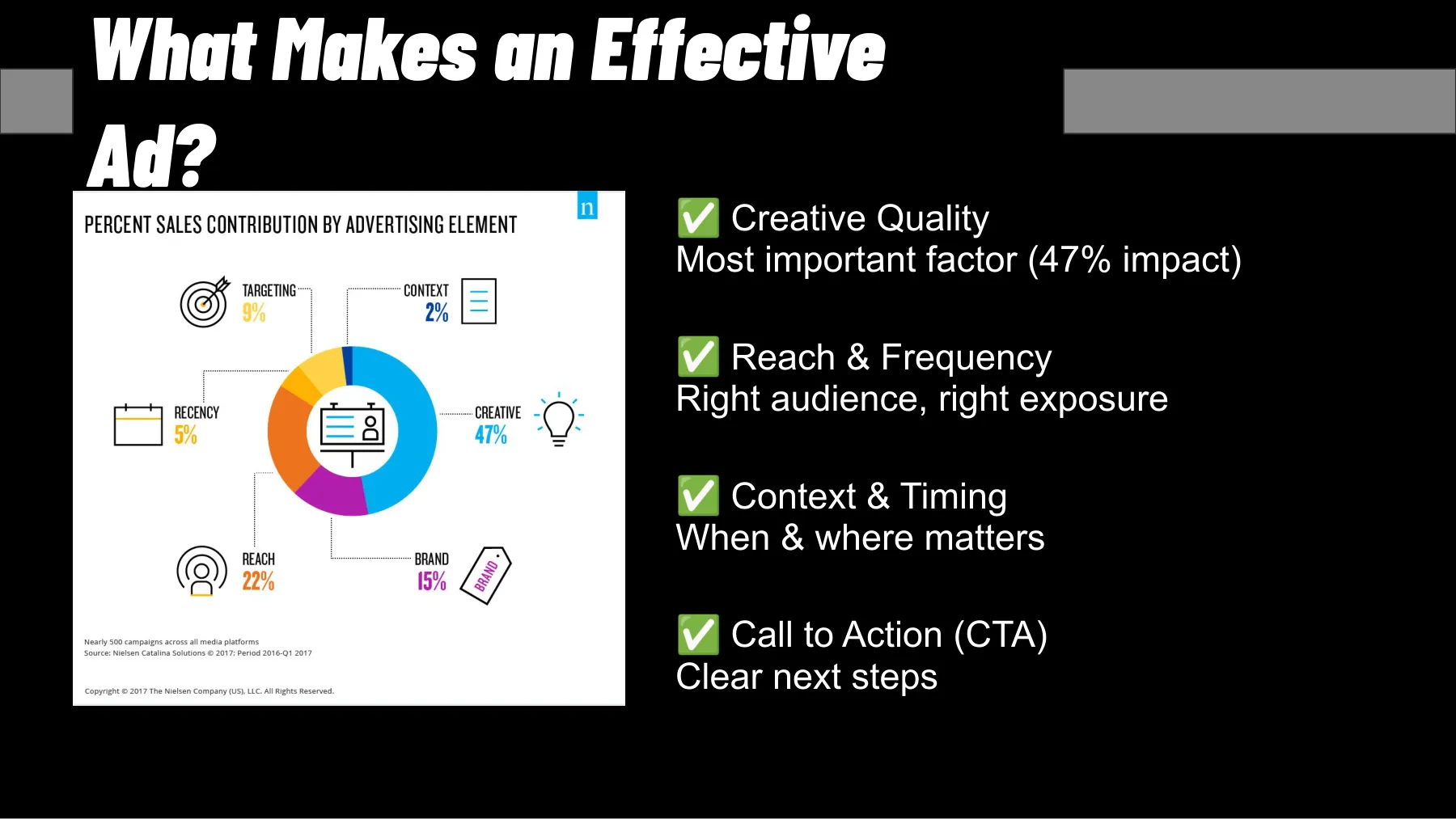
For discussion
How many visuals did you make yourselves in the past week (a story, a presentation, a poster for the noticeboard), and in what? Which of them would you dare to send to print?
2Four principles: contrast, repetition, alignment, proximity
The eye has to know where to go first
- ·Contrast: if two things are different, make them very different
- ·Repetition: same elements, same treatment; the whole holds together
- ·Alignment: nothing on the page by chance; everything aligns to something
- ·Proximity: what belongs together stays together; white space is a tool
- ·Hierarchy: three levels, first, second, third
Robin Williams (the designer, not the actor) boiled the basics of visual design down to four principles in The Non-Designer’s Design Book (1994), with the unflattering acronym CRAP: Contrast, Repetition, Alignment, Proximity. Contrast: elements are either the same or clearly different; a heading two points bigger than the body text isn’t contrast, it’s a mistake. Repetition: colors, fonts, and spacing repeat so the reader can tell what is what. Alignment: every element has a visual connection to another; nothing just sits “somewhere.” Proximity: things that belong together sit together, with space between the groups.
Together they give you a hierarchy with three levels: one thing the reader sees in half a second (the name of the tournament), a second that makes them stop (the date, an image), and a third they read if they want to (details, a QR code, partners). When every element has the same weight, the eye has nowhere to go, and it leaves. The test: squint until the image blurs. Are three blobs left, in the right order? Then the hierarchy works. Is it a gray mush? Make one thing bigger and everything else smaller.
White space is the cheapest contrast tool there is. A beginner fills every centimeter because “they paid for it”; a professional leaves half of it empty so the other half can shout. A grid helps: invisible columns that everything aligns to; Canva and Figma both have one built in. When you don’t know what to add, take something away.
- -One main thing, one secondary thing, the rest small: three levels, not five.
- -Two font sizes that differ by at least a factor of two, not five sizes two points apart.
- -Everything aligned to one edge or axis; centered only on a poster, never for body text in paragraphs.
- -Related things together (date and venue), breathing room between groups.
- -The squint test and the tram test: can I read it in 2 seconds from 3 meters away?
For discussion
Think of the last poster you saw on a noticeboard: where did your eye go first, and was that the most important thing? What should its designer have made smaller?
3Fonts: categories, pairing, licenses, Czech diacritics
Two fonts are enough; check the Czech
- ·Serif, sans serif, slab, mono, display, script: each has a role
- ·Two families are enough: one for headings, one for body text
- ·Lines of 45–90 characters, body text on the web from 16 px
- ·Google Fonts: about 1,950 families for free, mostly under the OFL
- ·Czech: check ď ť ů ě; not every font handles them well
Readers perceive a typeface before they read a single word. The categories: serif (Times, Georgia; trust, long texts on paper), sans serif (Helvetica, Inter; screens, modern brands), slab serif (blocky serifs: Rockwell; strength, sport), monospace (every character the same width: IBM Plex Mono; code, tables), display (headings only), and script (handwriting style; a few words on an invitation). The same “Czech Championships” in Rockwell sounds like a sports hall, in Georgia like a gala evening, and in Comic Sans like a school cafeteria.
Two families, no more: one for headings (it can be striking), one for body text (readable at small sizes). They should differ clearly, never be “almost the same”; often a single family with several styles (Light, Regular, Bold, Condensed) is enough. Line length should be 45–90 characters including spaces (Butterick, Practical Typography); on a longer line, the eye gets lost on the way back. On the web, body text starts at 16 px. For a poster, work from the viewing distance: as a rough guide, one centimeter of letter height for every meter.
Licenses are a trap with fonts. As of October 2026, Google Fonts offers about 1,950 families, mostly under the SIL Open Font License: commercial use, modifications, and embedding in a website with no fee. You only have Adobe Fonts for as long as you subscribe to Creative Cloud. Type foundries (Monotype as well as independents) sell separate licenses for desktop, web, apps, or logos. A font from DaFont is often “free for personal use,” and a club poster with partners is already commercial use.
How much does type cost? Google Fonts is free. Adobe Fonts offers more than 30,000 fonts with a Creative Cloud subscription, and you may use the whole library for both personal and commercial work: in design including logos, on the web, in PDFs, and in video. With a type foundry, you buy a license based on how you’ll use the font. The Czech Storm Type Foundry lists the Andulka Sans family of 12 styles at CZK 6,647, roughly CZK 554 per style, and sells separate licenses for desktop, web, apps, e-books, digital ads, and logos. Prices are as of October 2026.
And Czech. Not every font has a complete Central European character set, and the quality of the diacritics varies: ď and ť should have a caron shaped like an apostrophe, ů a ring that doesn’t blur into an acute accent, and ě a caron that doesn’t collide with the letter. Type “Příliš žluťoučký kůň úpěl ďábelské ódy” into the preview and take a close look. On the web, serve only the styles you actually use, in woff2 format: according to HTTP Archive, the median home page carried 131 KB of fonts in 2024.
- 1,950
- font families on Google Fonts, 561 of them variable (October 2026)
- 45–90
- characters per line for comfortable reading
- 131 KB
- of fonts on the median home page (desktop, 2024)
- CZK 6,647
- the 12-style Andulka Sans family in the Storm Type price list (October 2026)
fonts.google.com
Butterick: Practical Typography
HTTP Archive: Web Almanac 2024
stormtype.com
Rabbit holes
- Google Fonts ↗ · About 1,950 families for free, a language filter (Czech), and pairing in the preview.
- Google Fonts Knowledge ↗ · Clear articles on typography, from choosing a typeface to variable fonts.
- Butterick: Practical Typography ↗ · The best free book on typography for non-typographers; see the chapter on line length and font size.
- SIL Open Font License ↗ · What the OFL allows (commercial use, web, modifications) and what it asks in return.
4Color: RGB, CMYK, Pantone, and contrast
Your HEX won’t come out of the printer the same
- ·RGB glows (screens), CMYK prints, Pantone mixes a spot color
- ·The CMYK gamut is smaller: vivid screen tones go dull in print
- ·Text contrast at least 4.5:1 (WCAG AA), large text 3:1
- ·1 in 12 men has a color vision deficiency: color never carries information alone
- ·The 60-30-10 rule: base, secondary, accent
Color exists in three worlds. RGB is light: a screen mixes red, green, and blue, and together they make white; it’s written as HEX (#B3261E). CMYK (cyan, magenta, yellow, key = black) is print: four transparent inks on paper. The CMYK gamut, its range of colors, is smaller than a screen’s, so a vivid orange, a saturated blue, and a bright green go dull once printed. That’s why a designer converts to CMYK before printing and asks for a proof, and that’s why the red from your phone came out of the printer brown.
Pantone is a numbered swatch book of spot colors that the printer mixes ready-made instead of building them from four inks. Thanks to it, a company has the same red on its business cards, trucks, and jerseys. But it’s a licensed product: in 2022, the Pantone libraries disappeared from Photoshop and Illustrator, and colors in older files showed up as black until the user paid about $15 a month for Pantone Connect. So a brand manual should list three values: HEX for the web, CMYK for print, and Pantone where the exact shade matters.
The other half is readability. WCAG 2.2, the web accessibility standard, requires a contrast ratio against the background of at least 4.5:1 for normal text (level AA), 3:1 for large text (18 points and up, or 14 if bold), and 7:1 at level AAA. You can measure it for free in the WebAIM Contrast Checker. Light gray text on white, a popular “elegant” effect, often doesn’t even reach 3:1. A projector is dimmer than a monitor, so the contrast on the big screen is even worse.
According to the U.S. National Eye Institute, about 1 in 12 men has a color vision deficiency, and according to Colour Blind Awareness about 1 in 200 women; most often, red and green blur together. In a hall with 300 men, that’s 25 people. So color never carries information on its own; it always comes with text, a shape, or an icon. For a palette, the 60-30-10 rule is enough: 60% base, 30% secondary, 10% accent. The Coolors generator helps, but the brand manual decides.
- 4.5:1
- minimum contrast for normal text, WCAG 2.2 level AA
- 1 in 12
- men have a color vision deficiency; for women, about 1 in 200
- $15/mo
- for Pantone Connect when the libraries left Adobe in 2022
W3C WCAG 2.2
NEI, Colour Blind Awareness
The Verge, November 2022
For discussion
Why does your club’s red look different on your phone than on the jersey and the poster? In which of the three worlds did it get lost?
Rabbit holes
- WebAIM: Contrast Checker ↗ · Two colors in, the ratio and an AA/AAA verdict out; large text included.
- W3C: Understanding Contrast (Minimum) ↗ · Where 4.5:1 comes from and what counts as large text.
- Pantone: Color of the Year 2026 ↗ · Cloud Dancer 11-4201, an almost-white: how a swatch book becomes an annual PR event.
- Coolors ↗ · A palette generator with a contrast check and color blindness simulation.
5Images: formats, compression, resolution, licenses
A photo for the web: WebP, 1,600 px, 150 KB
- ·JPEG photos, PNG transparency, SVG logos and icons, WebP and AVIF for the web
- ·WebP is 25–34% smaller than JPEG at the same quality
- ·The median page is 2.6 MB; images are the biggest item
- ·Print at 300 dpi: A4 = 2,480 × 3,508 px; for the web, 1,600 px wide is enough
- ·Stock: Unsplash and Pexels are free, but read the license
Every format has a role. JPEG is for photos: lossy compression, no transparency. PNG is for graphics with transparency and sharp edges (a logo, a screenshot); for photos, it’s unnecessarily large. SVG is vector: logos, icons, charts, scalable without loss, and small. WebP and AVIF are web formats: according to a Google study, WebP is 25–34% smaller than JPEG at the same quality. The rule: photos for the web in WebP, logos in SVG, PDF or TIFF for print, PNG for presentations.
According to HTTP Archive, the median desktop page weighed 2,652 KB in 2024, and 2,311 KB on mobile. Images are the biggest item: a home page with images carries a median of 1,054 KB of them, more than JavaScript. On mobile, that means waiting and people leaving (the Internet chapter). A photo from a phone is 4 to 8 MB and 4,000 px wide; for the web, 1,600 px and 150 to 300 KB is enough. Squoosh does it for free, right in your browser.
Screens work in pixels, print in dots per inch (dpi). Quality print assumes 300 dpi at print size: A4 needs about 2,480 × 3,508 px. An image from the web (1,200 px) on an A2 poster has about 70 dpi and breaks up into little squares; you can always scale down, never up. Banners and roll-ups are fine at 100 to 150 dpi, since people look at them from meters away. Never use a screenshot of a logo: ask for SVG, PDF, or EPS.
A photo is a copyrighted work, even one from a phone and even one “from Google.” You can use libraries like Pexels and Unsplash commercially and for free; Pexels doesn’t require attribution, but it prohibits, for example, selling unaltered copies or giving the impression that a person in the photo endorses you. Paid stock libraries (Shutterstock, Adobe Stock, Getty) sell royalty-free licenses (you pay once and use it repeatedly) or rights-managed ones (priced by use, print run, and territory). With a commissioned photographer, the license is in the contract (see the Suppliers section). You may publish a person’s likeness only with their consent (Section 85 of the Czech Civil Code), with exceptions for news reporting: an athlete on the podium, yes; a close-up of a spectator in the stands, better not.
How much does a stock license cost? Adobe Stock charges €29.99 a month in the Czech Republic, with an annual commitment, for 10 credits: that’s ten images, or at most one video. Without a subscription, you can buy a pack of 40 credits for €269.99, which covers 40 standard images or just five HD videos, so an image comes to about €6.75 and a video to €54. The standard license is perpetual. But a print run with the image may not exceed 500,000 copies, though this limit doesn’t apply on the web and social media, and the image may not appear on merchandise you sell, such as a mug; that requires an extended license. Envato takes the opposite approach: from €14.50 a month, you download unlimited photos, videos, music, and fonts, but each download licenses one specific project. If you cancel, finished projects stay covered, but you may not use downloaded items in new ones. Prices are as of October 2026.
- €29.99
- a month for 10 images on Adobe Stock, with an annual commitment (October 2026)
- 500,000
- copies: the print-run cap under the Adobe Stock standard license
- €14.50
- a month and up: Envato, unlimited downloads, one license per project
Adobe Stock (Czech site)
Adobe Stock (Czech site)
Envato (October 2026)
Median home page by resource type (desktop, 2024)
unit: KB
Medians for each resource type; they don’t add up to the total page weight. Images are the biggest item.
data table
| Images | 1,054 KB | |
|---|---|---|
| JavaScript | 613 KB | |
| Video | 243 KB | |
| Fonts | 131 KB | |
| CSS | 78 KB | |
| HTML | 18 KB |
Rabbit holes
- Squoosh ↗ · Compression and conversion to WebP/AVIF in the browser, with a before-and-after preview.
- Google: WebP Compression Study ↗ · Where the 25–34% comes from.
- Pexels License ↗ · What you can and can’t do with free photos; a model for how to read licenses.
- HTTP Archive: Web Almanac 2024 ↗ · How much the web weighs and what it’s made of; charts over the years.
6Video: formats by device, bitrate, codecs, captions
Shoot once in 16:9, cut for the phone
- ·9:16 for phones, 16:9 for the big screen, 4:5 for the feed
- ·Shoot 16:9 (or 4K), cut to 9:16, watch the safe zones
- ·1080p, 25 fps, bitrate 8 Mbps; 4K needs 35–45 Mbps
- ·H.264 plays everywhere, H.265 halves the file, AV1 is royalty-free
- ·Captions extended viewing time by 12% (Facebook, 2016)
Today, video is made for the device. 16:9 (1920 × 1080) is TV, YouTube, projectors, and the web. 9:16 (1080 × 1920) is a phone held upright: Reels, TikTok, Shorts, stories. 4:5 (1080 × 1350) takes up the most space in the Instagram and LinkedIn feeds, and 1:1 works everywhere, but only so-so. For ads, TikTok recommends 9:16 with a minimum of 540 × 960 px; YouTube Shorts are vertical videos up to 3 minutes long. Platforms cover part of the frame with the post text and buttons, which is why there are safe zones: keep text in the middle part and leave roughly the bottom fifth of the height clear.
Shoot once and cut for several formats. Shoot 16:9, ideally in 4K, with the main subject in the center; from 4K you can crop 9:16 and 4:5 in full 1080p. An interview for Reels can be shot vertically from the start; a panel discussion can’t. The frame rate in Europe is 25 fps (50 for sport), because the power grid runs at 50 Hz and the lights in a sports hall flicker at 30 fps; YouTube wants you to upload at the frame rate you shot in. 4K gives you headroom for cropping and for LED walls at events. You can also borrow a format from another field: the drone fly-through of the HOPI warehouses was modeled on a video by an NFL club; the story is in the Trends chapter.
Bitrate is the amount of data per second, and it matters more for file size than resolution does. For SDR at 24–30 fps, YouTube recommends: 720p at 5 Mbps, 1080p at 8 Mbps, 4K at 35 to 45 Mbps; at 50–60 fps, roughly half as much again. A minute of 1080p at 8 Mbps is 60 MB. Export MP4 with the H.264 codec and AAC audio: it plays everywhere, from projectors to Teams. H.265 (HEVC) gives you roughly half the file size, but it doesn’t play everywhere; AV1 is royalty-free, and both YouTube and Netflix stream in it.
And sound, or rather the lack of it. In February 2016, Facebook said that when a video in the mobile feed unexpectedly starts playing with sound, 80% of people react negatively, and that in its internal tests captions extended average viewing time by 12%. The numbers are ten years old, but the conclusion still holds: video for social media has captions, the first three seconds work without sound, and the punchline doesn’t wait until the end. Live broadcasting and the signal chain are covered in the Streaming chapter.
- -YouTube, web, projector: 1920 × 1080, 25 fps, H.264, 8 Mbps, AAC, MP4.
- -Reels, TikTok, Shorts: 1080 × 1920, 25 or 30 fps, short, captions, text in the middle third.
- -Instagram and LinkedIn feed: 1080 × 1350 (4:5), the point in the first second, clear without sound.
- -LED wall at an event: resolution depends on the wall (ask the technician), 50 fps.
- -Archive: the original in the highest quality plus the source project, not just the export for social.
Recommended bitrate for uploading to YouTube (SDR, 24–30 fps)
unit: Mbps
Four times the pixels (1080p → 4K) needs roughly four to five times the data; for 4K, the lower bound of 35 Mbps is shown.
data table
| 720p | 5 Mbps | |
|---|---|---|
| 1080p | 8 Mbps | 12 Mbps at 50–60 fps |
| 1440p | 16 Mbps | |
| 2160p (4K) | 35 Mbps | 35–45 Mbps; 53–68 at 50–60 fps |
For discussion
What did you watch video on today: a phone held upright, or a computer? How much of it without sound? What does that mean for a video from your club’s tournament?
Rabbit holes
- YouTube: Recommended upload encoding settings ↗ · The table of bitrates, codecs, and frame rates; the standard most of the world exports to.
- TikTok: Video Ads Specifications ↗ · Aspect ratios, minimum resolution, length, and downloadable safe zones.
- YouTube Shorts: the basics ↗ · What a Short is (vertical, up to 3 minutes) and how to upload one.
- Meta: Updated features for video ads (2016) ↗ · The original article with the figures on video without sound; data from 2015 and 2016.
7Tools: what to make it with and what it costs
Choose a tool by the output, not by the price
- ·Free: Photopea, Affinity, DaVinci Resolve
- ·Cheap: Canva Pro CZK 2,400/yr, Figma from $16/mo
- ·Pro: Adobe CC Pro €79.30/mo, Photoshop alone €26.43/mo
- ·Tools don’t design: the template, the brand manual, and your eye decide
The price of tools has dropped to zero. Photopea, Photoshop in the browser including layers and PSD files, was written single-handedly by Ivan Kutskir, who runs it from Prague; it’s free, with ads. Since October 2025, Canva has made Affinity (vector, photo, and layout in one app) free for individuals. DaVinci Resolve, an editing and color grading suite that even Hollywood films are cut in, is free; the paid Studio version costs a one-time $295. Add to that CapCut (editing on your phone, with captions), Squoosh (compression), Snapseed (photo editing on your phone), and Canva Free.
The paid tier is cheap if you need it. Canva Pro costs CZK 2,400 a year in the Czech Republic and adds a brand kit (colors, fonts, logos for the team) and background removal. Adobe Express Premium costs €12.09 a month in the Czech Republic and gives you access to Adobe Fonts. Figma Professional costs $16 per editor per month billed annually ($20 billed monthly), and viewing is free; it’s the standard for designing websites and apps. Adobe Creative Cloud Pro with all the apps costs €79.30 a month (€44.39 the first year for new customers), and Photoshop, Illustrator, Premiere, or InDesign on its own costs €26.43 a month.
Students get some tools for free or cheaper; they just need to verify their student status. Figma and FigJam are free for students, educators, and schools, on the Professional tier. Envato gives students 31% off the Core plan, and the Czech foundry Storm Type gives them half off its fonts, but only for nonprofit projects; anyone who wants to keep using a font after school has to upgrade to the standard license. Before you subscribe to anything, find out what you’re entitled to through your school. Prices are as of October 2026.
Don’t choose “the best tool,” choose the best tool for the output and for whoever carries on after you: a colleague can edit a Canva template without you; an open InDesign file, not so much. Mix tools without thinking and you’ll end up with a logo in three versions and a presentation nobody else can open. And the most expensive item in production isn’t licenses, it’s time: templates and automation save it, not expensive software.
- -Print (poster, brochure, business card): Affinity, InDesign, Illustrator. Output: PDF/X, CMYK, bleed.
- -Social media and team presentations: Canva, Adobe Express. A template with a brand kit, PNG/MP4 export.
- -Web and apps: Figma. Developers read dimensions, colors, and fonts straight from the design.
- -Video: DaVinci Resolve or Premiere for commissioned work, CapCut for clips from a phone.
- -Photo: Photopea (browser), Lightroom (batches), Snapseed (phone), Squoosh (compression), remove.bg (backgrounds).
- -AI images: Midjourney, Higgsfield, Adobe Firefly, GPT Image; see the AI in production section.
- $0
- Affinity for individuals since October 2025 (vector, photo, layout)
- $295
- DaVinci Resolve Studio, one-time; the basic version is free
- €79.30
- Adobe Creative Cloud Pro per month, €44.39 the first year
- CZK 2,400
- Canva Pro per year for one person
affinity.studio
Blackmagic Design
Adobe (Czech site)
Canva (Czech site)
Rabbit holes
- Photopea ↗ · Photoshop in the browser for free; opens PSD, AI, and Figma files.
- Affinity by Canva ↗ · Professional vector, photo, and layout, free for individuals.
- DaVinci Resolve ↗ · Editing, color, audio, and effects in one app; the basic version is free.
- Canva: pricing ↗ · What’s in Free, Pro, and Business; nonprofits get Pro for free (in Czech).
8Print: offset or digital, bleed, sizes, paper
The printer wants bleed, CMYK, and PDF/X
- ·A0 = 1 m², each next size is half; B1 for posters on advertising pillars
- ·Bleed 3 mm, text and logo 3–5 mm from the trim, crop marks
- ·CMYK and 300 dpi; never an RGB screenshot from the web
- ·Offset for hundreds and thousands of copies, digital from a single copy
- ·Paper: 80 gsm office, 135–170 gsm flyer, 300 gsm business card
- ·1,000 A5 flyers for CZK 1,565, 100 for CZK 1,046 (excl. VAT, October 2026)
Paper sizes are set by the ISO 216 standard. A0 has an area of exactly 1 m² (841 × 1,189 mm), and each next size is made by halving the longer side: A2 is 420 × 594 (a noticeboard poster), A4 is 210 × 297, A5 is 148 × 210 (a flyer). The aspect ratio is always 1 : √2, which is why A4 scales down to A5 without changing shape. The B series is larger and used for posters: B1, at 707 × 1,000 mm, is the standard “pillar poster.” That’s also where paper weight comes from: g/m² is the weight of one A0 sheet. Office paper is 80 gsm, a flyer 135 to 170 gsm, a business card 300 to 350 gsm.
Three words a printer will always use. Bleed is color or an image extending past the edge of the format, usually 3 mm on each side; the cutter has a tolerance, and without bleed you get a white strip. Crop marks show where to cut. The safe zone is 3 to 5 mm in from the trim, where you don’t put text or logos. You export PDF/X-1a or PDF/X-4 (print standards with embedded fonts and colors) in CMYK, with images at 300 dpi. Canva, Affinity, and InDesign all have a “bleed and crop marks” option when exporting: turn it on.
The technology depends on the print run. Offset transfers ink from metal plates; making the plates costs the same for 100 copies as for 10,000, so from a few hundred copies up it’s the cheapest per copy, and it can do Pantone spot colors and varnishing. Digital printing is basically a big laser printer: no setup, from a single copy, right away, and every copy can be different (names on certificates). As a rough guide: 20 A2 posters means digital, 2,000 A5 flyers means offset, and for around 200 copies, get quotes for both. Large format (a banner, an 85 × 200 cm roll-up) is printed on a plotter, and 100 to 150 dpi is enough.
Paper and finish shape the impression: gloss coated paper gives rich photos but reflects light, matte is elegant and readable, and lamination protects covers and business cards. Before a large print run, ask for a proof or a single copy: 2,000 flyers with a typo in the date can’t be sent back. Ask the printer for a quote with a finished spec, following the list below; color is written as 4/4 (CMYK on both sides) or 4/0 (one side). Without a spec, you’ll get a price that changes once you deliver the files.
How much does it cost? In October 2026, the online printer eprinting.cz listed A5 flyers on 130 gsm gloss coated paper, full color on both sides, at CZK 1,046 for 100 copies and CZK 1,565 for 1,000 copies, both excluding VAT and with free shipping. Ten times as many flyers cost only half as much again: one flyer comes to CZK 10.46 at 100 copies, CZK 1.57 at 1,000, and CZK 0.45 at 10,000 (chart below). But a flyer is cheap only if you actually hand it out. Price lists also differ: a similar flyer on 135 gsm matte coated paper costs CZK 2,430 for 1,000 copies excluding VAT in the indicative price list of the Prague print shop Carter, so it pays to get quotes from two or three printers.
In the same calculator, 100 A2 posters on 130 gsm gloss coated paper, printed on one side, cost CZK 2,641, or CZK 26 apiece. Single-sided business cards on 350 gsm matte coated paper come to CZK 588 for 100 and CZK 938 for 1,000. print.cz sells an 85 × 200 cm roll-up with printing and a bag for CZK 950 in its cheapest version and for CZK 1,650 in its premium version, with a stabilizer and a padded bag. All prices exclude 21% VAT.
- -Size and orientation (A5 portrait), number of pages, color 4/4 or 4/0.
- -Bleed 3 mm, crop marks, text and logo at least 3–5 mm from the trim.
- -PDF/X, CMYK, images at 300 dpi, fonts embedded or converted to outlines.
- -Paper and weight (135 gsm flyer, 300 gsm business card), finish (matte, gloss, lamination).
- -Print run and deadline; a proof or a single copy before the full run.
- -Test any QR code on the print from a printed copy, not from the screen.
- 1 m²
- the area of an A0 sheet, hence paper weight in g/m²
- 3 mm
- standard bleed on each side of a print job
- 707 × 1,000
- mm is B1, the standard pillar poster
- CZK 1.57
- per A5 flyer at 1,000 copies, CZK 10.46 at 100 (excl. VAT, October 2026)
ISO 216
Wikipedia: Bleed (printing)
ISO 216
eprinting.cz
Price per 100 A5 flyers by order size (excl. VAT)
unit: CZK
On an order of 10,000 copies, each hundred flyers costs 23 times less than on an order of 100. 130 gsm gloss coated paper, both sides, price list as of October 2026.
data table
| 100 copies | CZK 1,046 | |
|---|---|---|
| 200 copies | CZK 608 | |
| 500 copies | CZK 277 | |
| 1,000 copies | CZK 157 | |
| 2,000 copies | CZK 93 | |
| 5,000 copies | CZK 55 | |
| 10,000 copies | CZK 45 |
For discussion
How many posters would you print for your club’s tournament: 20, 200, or 2,000? How does that change the technology, the paper, and the price per copy?
Rabbit holes
- Wikipedia: ISO 216 ↗ · A table of all A, B, and C sizes with dimensions, and the math behind √2.
- Wikipedia: Bleed (printing) ↗ · Bleed, trim, and margins, with illustrations; why 3 mm.
- QRCode Monkey ↗ · Free QR codes with a logo and color, SVG export for print.
- eprinting.cz: flyer printing ↗ · Prices by print run with and without VAT, plus a guide to print files: bleed, 300 dpi, CMYK, PDF/X (in Czech).
9Suppliers: brief, budget, licenses
You’re buying a license, not the work
- ·Directory: two or three trusted contacts for each category
- ·Brief: goal, audience, deliverables, where it’s used, deadline, budget
- ·Contract silent? Only the purpose in the contract (Copyright Act, Section 61)
- ·Ask for the source files and the authors’ names
- ·Event photographer in thousands of CZK, video crew in tens of thousands (estimate)
- ·Music at an event: an OSA license; CZK 7.25 per spectator at sports (2026)
What you can’t do or don’t have time for, you buy: photo, video (crew, editing, animation), graphic design and layout, print, event production (tech, staging, catering), web, translation and proofreading. For each category, keep two or three trusted contacts in a supplier directory: name, what they can do, price, last job, and how it went. One contact is a risk: the photographer gets sick and the tournament doesn’t move.
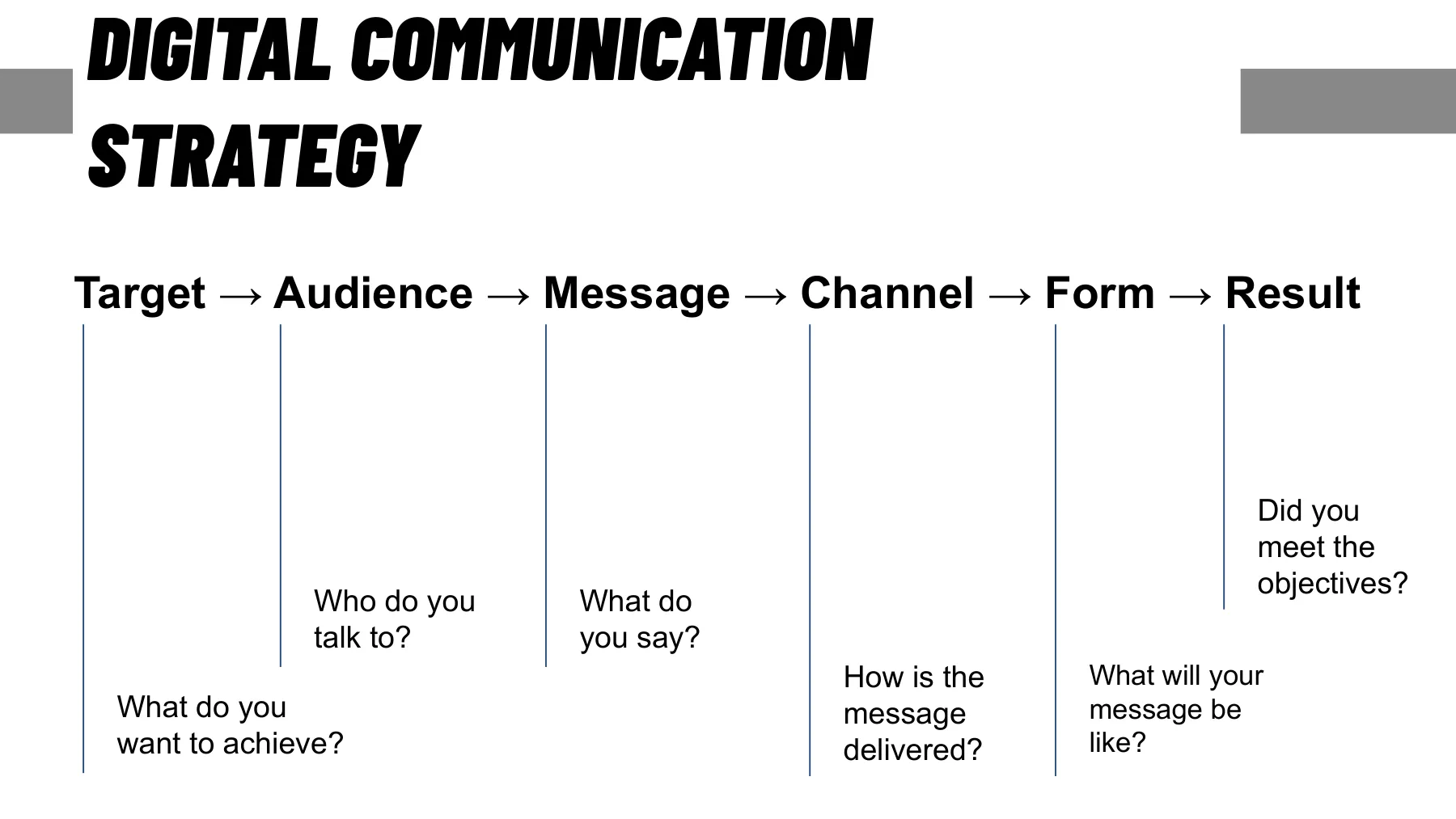
A supplier is only as good as the brief they get. It’s the Target → Audience → Message → Channel → Form → Result sequence from the Internet chapter, written on one page for someone from outside (checklist below). What’s missing most often is where and for how long the output will be used: both the license and the price depend on it.
In the Czech Republic, budgets run roughly like this (a rough estimate, not a price list; check by asking for quotes): a photographer for a half-day to full-day event, from a few thousand to the low tens of thousands of CZK; a video crew, tens of thousands of CZK per shooting day; a freelance designer, hundreds to low thousands of CZK per hour; 500 A5 flyers, the low thousands of CZK. Prices go up with the name, the season, and the rush. Ask for a breakdown: what’s included, what counts as extra work, how many rounds of revisions, and who pays for travel and for licenses to music or stock photos.
For freelancers, there is data too. In the Na volné noze survey from 2024, 421 people in design and multimedia responded: graphic designers, designers, illustrators, photographers, and camera operators. A third of them charge CZK 600 to CZK 999 an hour excluding VAT, a quarter CZK 1,000 to CZK 1,999, and only 3% more than CZK 2,000, while across all fields it’s just under 10%. But an hourly rate doesn’t tell you how many hours a job will take; only the breakdown shows that.
The license is the most often overlooked thing. Under the Czech Copyright Act, photos, video, graphics, and text are copyrighted works, and the author remains the author even after you pay them. What you buy is a license, the right to use the work. Unless agreed otherwise, Section 61 applies: the client who commissioned the work may use it for the purpose arising from the contract; anything beyond that (photos for a sponsor, paid advertising, resale) needs an additional license. A work created by an employee as part of their job is an employee work (Section 58), and the employer exercises the rights. An exclusive license must be in writing (Civil Code, Section 2358(2)). Photos of people also need the consent of the people pictured (Section 85 of the Civil Code); for athletes, this is handled by the event rules or the entry form.
Music is licensed separately. Music in a video and music played to people at an event are two different uses. For video, you buy it by subscription: Epidemic Sound charges nothing extra for publishing or monetizing a video, but it allows its music in paid ads only on the Pro and Enterprise plans, and it points public institutions, universities, and nonprofits to Enterprise. Envato and Adobe Stock also include music in their subscriptions. Music from speakers or a live band at an event is public performance, and the organizer gets the license from OSA, the Czech collecting society for music authors. Under the joint 2026 tariff, music from speakers as an accompaniment to a sports event costs CZK 7.25 per spectator excluding VAT for OSA, Intergram, and OAZA combined, so a tournament with 300 spectators pays CZK 2,175. When the music is an essential part of the program, as at dance competitions or aerobics, it’s CZK 19.44 per spectator. For live music, send the request at least five days before the event along with the set list; otherwise OSA charges a rate 15% higher.
- -Goal and audience: what it’s for and who will see it.
- -A list of deliverables with formats and dimensions; where and for how long they’ll be used.
- -Delivery deadline, event date, who approves, number of revision rounds.
- -Budget or its ballpark; what counts as extra work.
- -References: 3× like this, 1× not like this; materials (SVG logo, manual, copy).
- -License: channels, territory, duration, exclusivity, modifications, author, source files, music and stock.
- CZK 600–999
- most common hourly rate for freelance designers, photographers, and camera operators, excl. VAT
- CZK 7.25
- per spectator: music from speakers at a sports event, excl. VAT (2026)
- 5 days
- ahead: the request for live music, otherwise a rate 15% higher
Na volné noze 2024
OSA, Intergram, OAZA joint tariff
OSA tariff 2026
For discussion
A photographer sent you 300 photos from a tournament, and the sponsor wants them for its website. Are you allowed to give them? What had to be in the order so you wouldn’t have to call a lawyer?
Rabbit holes
- Czech Copyright Act No. 121/2000 Coll. ↗ · Section 2 the work, Section 58 employee works, Section 61 commissioned works: what the sponsor is asking about (in Czech).
- Czech Civil Code No. 89/2012 Coll. ↗ · Sections 84–90 likeness and consent, Section 2358 et seq. license agreements (in Czech).
- OSA: public performance tariffs ↗ · The 2026 tariffs: a sports event with music from speakers is in the joint tariff for recorded music, one with a band in the live music tariff (in Czech).
- Na volné noze: 2024 survey, design and multimedia ↗ · Answers from 421 graphic designers, designers, photographers, and camera operators: rates, clients, free capacity (in Czech).
10Process: versions, file names, pre-delivery checks
The word “final” is banned
- ·Brief → concept → v1 → proofreading → v2 → export → archive
- ·The file name carries the date, project, output, format, and version
- ·One source of truth: brand manual, templates, shared drive
- ·Preflight: text, diacritics, numbers, colors, bleed, format, license, QR
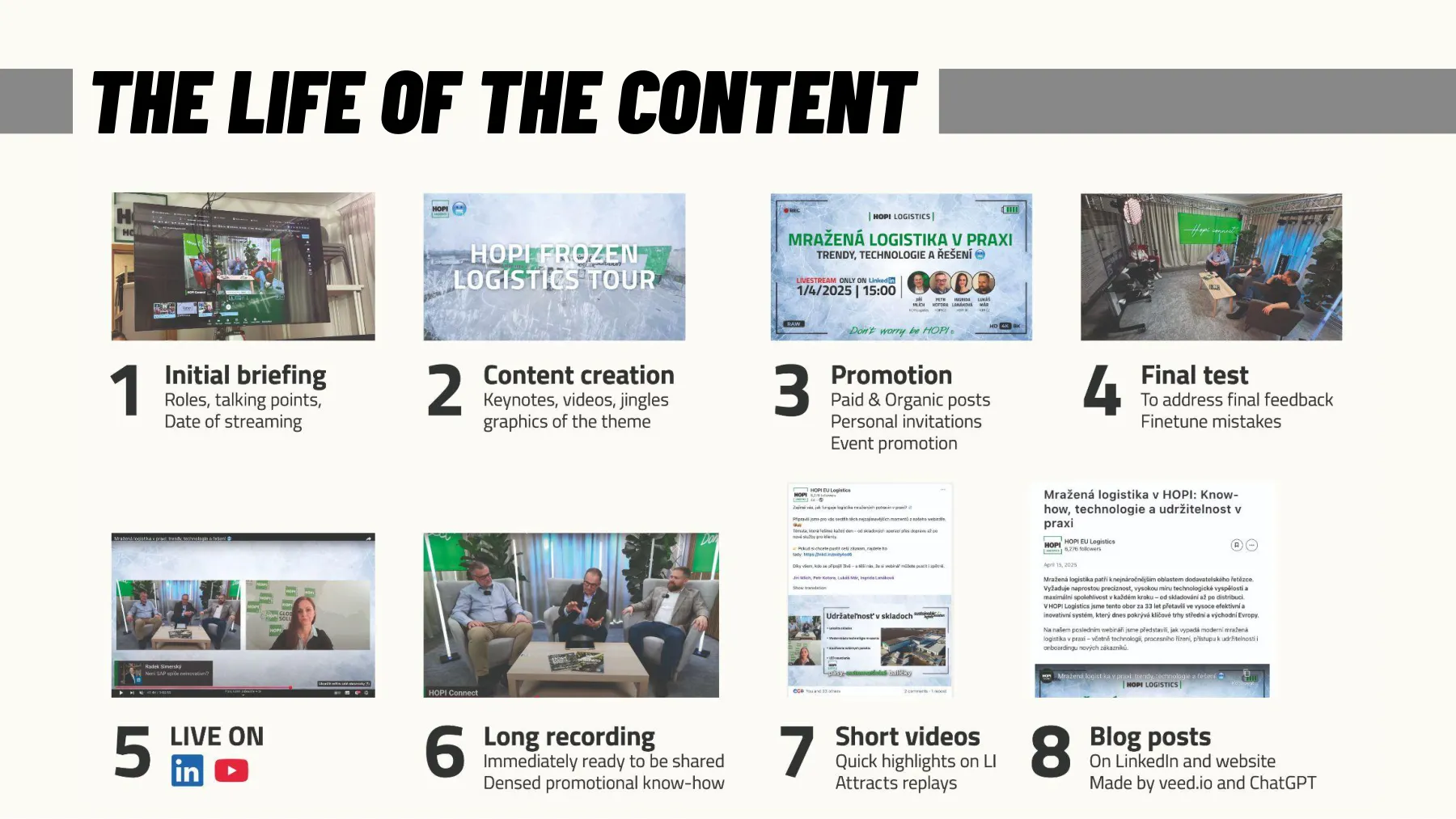
Most production mistakes happen between the steps, not within them. The basic sequence: brief → concept (a sketch, a mood in images, the so-called moodboard) → v1 → proofreading (text, numbers, names, logos) → v2 → approval → export for each channel → archive. Each step is signed off by one person; “everyone approved it” means nobody read it. Programmers have branches, versions, and test environments (see Internet); graphic design and video mostly don’t, which is why the file “poster_final_FINAL2_fix.pdf” exists.
File names are the cheapest document management there is. A good name tells you what the file is without opening it: 2026-11-08_tournament-prague_poster_A2_v3.pdf, that is, date, project, output, format, version. A date in year-month-day form sorts files on its own. The word “final” is banned; the version gets a number. Archive the source files next to the exports, or a year from now you won’t be able to change even a phone number. Larger teams have a digital asset management system (DAM: Bynder, Brandfolder); smaller ones are fine with a shared drive with a fixed structure and a brand manual.
Before delivery comes the preflight, a checklist you always read in full, even if “it’s just a story” (list below). Five minutes of checking costs less than a reprint, or a deleted post that already has two hundred comments about the wrong date.
- -Text: typos, date, venue, prices, names with diacritics, phone number, website.
- -Partner logos: current version, legible size, order as set in the contract.
- -Colors: CMYK for print, 4.5:1 contrast on screen, the accent on just one thing.
- -Format: correct size and orientation, 3 mm bleed, safe zone, 300 dpi.
- -Licenses: photos, music, fonts; the author credited where they should be.
- -QR codes and links: scan from the printout, tap from a phone; UTM parameters.
- -Archive: the source file plus exports named with date, project, format, and version.
11AI in production: images, video, sound, and the rules
AI for backgrounds and variants, not for an athlete’s face
- ·Images: Midjourney V8, Higgsfield, Firefly; video: Veo, Sora, Seedance
- ·Edits: remove the background, fill in a missing part, extend the frame
- ·Weak spots: hands, text, logos, real faces, the same character in a series
- ·AI Act Art. 50: from August 2, 2026, deepfakes must be disclosed
- ·The author is a human; pure AI output has no author
AI has entered production in three places. Generating from text: Midjourney (version V8 from 2026), Higgsfield, Adobe Firefly, and GPT Image make an illustration, a background, or a mockup in minutes; Veo, Sora, Kling, and Seedance do the same with video lasting seconds. Editing: background removal, generative fill, extending a shot from 1:1 to 16:9, upscaling a small photo. Sound and voice: reading text aloud with a synthetic voice (ElevenLabs, OpenAI), background music, cleaning up recordings. Models and prices in more detail in the Artificial Intelligence chapter.
The weak spots are still the same: hands, text in the image, logos and specific products, faces of real people, and consistency of a character or style across a series. Newer models are improving (GPT Image and Midjourney V8 can handle text), but checking remains manual. The rule for marketing: AI for illustrations, backgrounds, variants, and concepts; never for a photo “from an event” that never happened, an athlete’s face without consent, or a partner’s logo. You only lose trust once.
The rules have caught up with practice. From August 2, 2026, Article 50 of the AI Act requires anyone who publishes a deepfake (an image, audio, or video that realistically resembles a real person, place, or event) to disclose that the content is artificial; for clearly artistic and satirical works, a notice that doesn’t spoil the work is enough. Providers of generators must label outputs in a machine-readable way; those on the market before August 2, 2026 have until December 2, 2026 under the Digital Omnibus amendment (Art. 111). You don’t have to label an ordinary illustration or background, but it’s good manners. And authorship: the Copyright Act protects a work that is “a unique result of the author’s creative activity” (Section 2), and the author is a natural person (Section 5). Output from a prompt alone therefore most likely has no author; the more of your own work goes into it, the closer it gets to being a work.
Services have their own terms. Midjourney allows commercial use on paid plans (from $10 a month), but a company with gross revenue over a million dollars a year must have the Pro ($60) or Mega ($120) plan. Read the terms before the campaign, not after. But the most expensive part isn’t the subscription; it’s the time spent selecting and checking: usually one variant out of many is usable, and even that one needs cropping, colors matched to the manual, and text added by hand. AI is an excellent assistant and a lousy art director.
- Aug 2, 2026
- obligation to disclose deepfakes (AI Act, Art. 50(4))
- Dec 2, 2026
- machine-readable labeling for generators on the market before August 2, 2026
- $1 million
- in revenue, above which Midjourney requires the Pro or Mega plan
- V8
- the Midjourney generation in 2026 (V8.1 in April, V8.2 in July)
EU AI Act, Articles 50 and 113
EU AI Act, Art. 111(4)
Midjourney: plans and terms
Wikipedia: Midjourney
For discussion
Where in your club would you use an AI image, and where never? How can you tell that someone sent you a photo from an event that never happened?
Rabbit holes
- EU AI Act: Article 50 ↗ · The exact wording of the transparency obligations: deepfakes, machine-readable labeling, exceptions.
- EU AI Act: Article 111 ↗ · The transition period until December 2, 2026 for generators that were already on the market.
- Wikipedia: Midjourney ↗ · The history of versions, what each one could do, and when it came out.
- Higgsfield ↗ · Images and video in one place, models from different makers; I use it for both images and video.
12Summary: fewer elements, more contrast, the right format
Fewer elements, more contrast, the right format
- ·Four principles and three levels of hierarchy; when in doubt, take it out
- ·Two fonts, three colors, 4.5:1 contrast, Czech diacritics checked
- ·9:16 for phones, 16:9 for the big screen, CMYK and bleed for print
- ·Brief, license, file names, preflight: that’s production
Production is a craft with rules that fit on one page (list below). AI speeds up illustrations, captions, proofreading, and variants; it won’t answer for the hierarchy, the truth, or what you published. This closes the whole course: marketing starts with the question of who and why, the brand holds the identity, advertising, social media, and events carry it to people, and production gives it shape, weight in kilobytes, and paper weight in g/m².
- -Assess: four principles, three levels, the squint test.
- -Make: two fonts, three colors, 4.5:1 contrast, the right format for the channel.
- -Export: WebP for the web, SVG logo, PDF/X for print, MP4 H.264 for video, 9:16 for phones.
- -Brief: a one-page brief, the license in the order, source files.
- -Check: preflight, QR from a printout, file names with date and version, deepfakes disclosed.
For discussion
Exercise: an A2 poster for your club’s tournament as a wireframe. What’s biggest, which two fonts, which three colors, what goes into the bleed, and what file does the printer get? The 9:16 story at home.
For the exam
Terms
- -Four principles (CRAP): contrast, repetition, alignment and proximity; together they give a three-level hierarchy, which you check with the squint test.
- -RGB and CMYK: RGB is screen light, CMYK four print inks with a smaller gamut, which is why files are converted to CMYK before printing and you ask for a proof.
- -Print resolution (dpi): quality print assumes 300 dpi at print size; you can always scale an image down, never up.
- -License: the right to use a work; the author remains the author, and if the contract says nothing, the client may use the work only for the purpose arising from the contract.
- -Public performance of music: music played to people at an event is a different use from music in a video; the organizer gets the license from OSA, and in 2026 music from speakers at a sports event costs CZK 7.25 per spectator excluding VAT in total.
- -Deepfake: an image, audio or video that realistically resembles a real person, place or event; under the AI Act, whoever publishes it must disclose that the content is artificial.
Numbers
- -4.5:1: minimum contrast between normal text and its background at level AA (W3C WCAG 2.2)
- -3 mm: standard bleed, color extending past the edge of the format, on each side of a print job (Wikipedia: Bleed (printing))
- -August 2, 2026: the date from which deepfakes must be disclosed (EU AI Act, Art. 50)
The final exam is online in the last lesson, in English: 30 questions with three options each from the whole course, and you need 80% to pass. It asks about the terms in the For the exam boxes and how to apply them, much like the quizzes at the end of each lesson.
Final quiz
1On a tournament poster, the name, date, venue, partners and QR code all have the same font size, and the squint test shows a gray mush. What do you fix?
- a)Make everything two points bigger so it reads from a distance
- b)Fill the empty spots with a photo so the poster isn’t bare
- c)Make the name bigger and the rest smaller: three levels
answer
c) Make the name bigger and the rest smaller: three levelsWhen every element has the same weight, the eye has nowhere to go, so you make one thing bigger and everything else smaller and get a three-level hierarchy (section 2)2A designer proposes a club website with light gray text on a white background, and normal text comes out at a contrast of 3.2:1. Does it pass WCAG 2.2 at level AA?
- a)Yes, level AA requires at least 3:1 for text
- b)No, normal text needs at least 4.5:1
- c)No, level AA requires 7:1 for all text
answer
b) No, normal text needs at least 4.5:1At level AA, WCAG 2.2 requires a contrast of at least 4.5:1 for normal text, while 3:1 is enough only for large text and 7:1 is level AAA (section 4)3You want a photo from the club website, 1,200 px wide, on an A2 poster. What do you do?
- a)Ask for the original; on A2 this one has only about 70 dpi
- b)Resample it to 300 dpi in an editor and send it to print
- c)Leave it; posters are read from afar, so 1,200 px is enough
answer
a) Ask for the original; on A2 this one has only about 70 dpiA 1,200 px photo has about 70 dpi on A2 and breaks up into little squares, because quality print needs 300 dpi and you can never scale an image up without loss (section 5)4A photographer shot a tournament on commission for the club website, and the contract says nothing about the license. A sponsor wants the photos for paid advertising. What applies?
- a)You may hand them over; you ordered and paid for them
- b)You may hand them over if you credit the photographer
- c)Paid advertising needs an additional license
answer
c) Paid advertising needs an additional licenseWhen the contract says nothing, the client may use the work only for the purpose arising from the contract (Section 61), and paid advertising or photos for a sponsor need an additional license (section 9)5An agency proposes an AI video for a club campaign in which a well-known athlete realistically says a sentence they never said. What applies from August 2, 2026?
- a)Only with the athlete’s consent, and disclosed as artificial
- b)Disclosing it as artificial is enough; consent isn’t needed
- c)Only the generator’s provider must label it; the campaign doesn’t
answer
a) Only with the athlete’s consent, and disclosed as artificialFrom August 2, 2026, the AI Act requires anyone who publishes a deepfake to disclose that the content is artificial, and an athlete’s face is never used without consent (section 11)
Sources worth clicking
- 1YouTube: Recommended upload encoding settings ↗ · The official table of bitrates by resolution and frame rate, container, codec, audio. In practice, it also works for LinkedIn and the web.
- 2HTTP Archive: Web Almanac 2024, Page Weight ↗ · How much the median page weighs and what it’s made of; images are the biggest item.
- 3W3C: Understanding Contrast (Minimum), WCAG 2.2 ↗ · Where the 4.5:1 and 3:1 ratios come from and how they’re measured.
- 4Google: WebP Compression Study ↗ · Methodology and result: WebP is 25–34% smaller than JPEG at the same quality.
- 5Butterick: Practical Typography, line length ↗ · Why 45–90 characters and how to measure it with the alphabet test.
- 6Czech Copyright Act No. 121/2000 Coll. ↗ · Section 2 (what a work is), Section 5 (the author is a natural person), Section 58 (employee works), Section 61 (commissioned works: a license for the purpose in the contract) (in Czech).
- 7EU AI Act, Article 50: transparency ↗ · The obligation to disclose deepfakes from August 2, 2026 and to label generator outputs in a machine-readable way; the transition period is in Art. 111.
- 8TechCrunch: Canva gets to $4B in revenue (2026) ↗ · Canva’s numbers for 2025: 265 million monthly users, 31 million paying, $4 billion ARR; what production looks like when people do it themselves.
- 9Google Fonts ↗ · A free font library with a Czech language filter and the OFL license.
Rabbit holes
- Wikipedia: ISO 216 ↗ · Why A0 is exactly 1 m² with a √2 aspect ratio: the math behind paper sizes.
- Wikipedia: Bleed (printing) ↗ · Bleed, trim, and margins, with illustrations.
- Wikipedia: Pantone ↗ · How colors became a licensed product and what happened with Adobe in 2022.
- Wikipedia: Photopea ↗ · Photoshop in the browser, written by one person; about $1 million a year from ads (2020).
- Wikipedia: AV1 ↗ · A royalty-free codec from Google, Netflix, and others, and what it means for video on the web.
- Colour Blind Awareness ↗ · 1 in 12 men, 1 in 200 women; simulations of how people see your graphics.
- Affinity by Canva ↗ · Vector, photo, and layout in one app, free for individuals since October 2025.
- Wikipedia: Canva ↗ · How a company from Perth got to 265 million monthly users and $4 billion in annual recurring revenue.